
 ZeroGPT
 GPTZero
 QuillBot
 Grammarly
 Copyleaks
 Scribbr
 Originality.ai
 Isgen.ai
 SciSpace
 Sapling
 Winston AI
 Undetectable AI
 Smodin
 Writer
 JustDone
 Phrasly
 Brandwell
 Crossplag
 DeCopy AI
 NoteGPT
 Surfer
 SurgeGraph
 AI Detector
 Walter Writes AI
 Merlin
 Monica
 Stealthwriter
 Humbot
 Rewritify
 YouScan
 AI-Detector
 RyRob
RyRob Turnitin
 Pangram
Word Counter
Count words, characters, sentences, paragraphs, and reading time as you write.
Track Text Length With EssayDone Word Counter
A word counter becomes useful when its statistics guide a concrete revision decision, such as trimming an application response or balancing sections.
Step 1: Measure the version that matters. Enter the current draft, section, title, or form response into the word counter rather than an outdated copy.
Step 2: Read the counts in context. Compare words, characters, sentences, paragraphs, and estimated reading time with the actual requirement and type of writing.
Step 3: Revise toward the constraint. Cut, expand, rebalance, or copy the text, then recheck the word counter after each meaningful change.
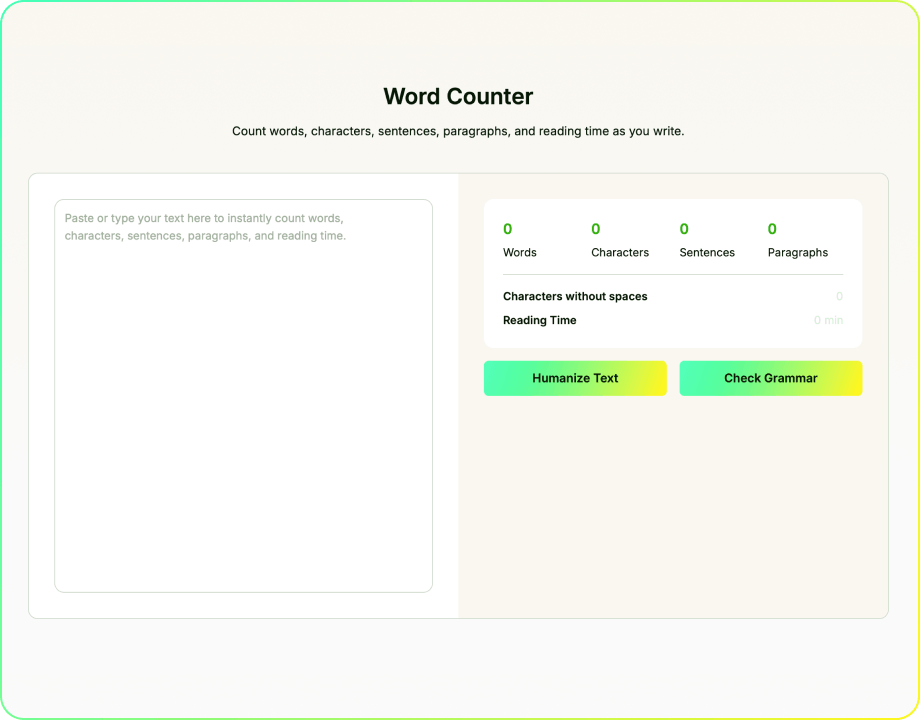
Live Word and Character Counts That Support Real Revision
Live Counts That Support Decisions
EssayDone Word Counter updates words, characters, sentences, paragraphs, and estimated reading time as the text changes. Use the totals to check a whole draft or isolate one section when only that material has a limit.
See What the Revision Changed
Compare totals before and after trimming, expanding, or restructuring a draft.
Use character count for titles, bios, captions, forms, and fields with strict character limits.
Check assignments, abstracts, reports, applications, and other writing against the correct length requirement.
Paste one section at a time when the introduction, abstract, or response has its own limit.

Turn Counts Into a Word Budget
Use section totals to see where a draft spends too much space, repeats background, or needs more development.
Five Measures in One Live View
Use live totals to decide where a draft exceeds the limit, leaves a section underdeveloped, or changes after revision.

See What Each Revision Changed
Compare versions after trimming, expanding, or restructuring instead of judging length by appearance.

Count the Section With the Limit
Check an abstract, body section, application answer, or caption separately when only that material counts.

Turn Totals Into a Word Budget
Separate limits for introductions, body sections, abstracts, form fields, or captions are easier to manage with section-level counts.

Useful Wherever Space Is Limited
Check the exact section that carries the limit instead of estimating from the appearance of the whole document.

Copy, Clear, or Continue Editing
Use the live totals as a revision signal, then move the text into the next writing or checking step.
What Counts Toward an Essay Word Limit?
A word counter online measures the text you paste, but it cannot know which parts your instructor, application, or journal includes. Confirm the counting rule before treating the total as final.
Count the Required Text, Not Just the Whole Document
- Rule source: The assignment, application, journal, or submission portal defines the limit. Do not assume a universal 10% tolerance or one rule for every document.
- Main text or full document: Some limits apply only to the body, while others include the abstract, headings, acknowledgments, or supplementary material. Read the exact wording first.
- Citations and references: In-text citations are often counted automatically because they appear inside the prose. Reference lists may be included or excluded, so verify the stated rule.
- Tables and notes: Tables, captions, footnotes, endnotes, and figure text are handled differently across institutions, journals, and document tools. Count them only when required.
- Selective counting: When only part of a document counts, paste that material into the word counter tool separately. Record body, abstract, and reference totals when necessary.
- Final verification: Counters may disagree on hyphenated terms, numbers, URLs, and technical strings. Use the required submission system as the final check and leave a small safety margin.

Turn an Essay Word Counter Into a Word Budget
A free word counter becomes more useful when you count sections separately. Compare how much space each section uses with the job it needs to perform.
The Section-Budget Audit

Define the Counted Text
Record the target range and which sections the limit includes.

Name Each Section's Job
Label each section by its job in the argument.

Set Rough Budgets
Assign rough ranges by importance, not equal division.

Count Sections Separately
Count sections separately and compare their space with their purpose.

Revise by Value
Cut repetition before evidence, analysis, definitions, or necessary qualifications.
Worked Example: A 1,500-Word Essay at 1,830 Words
The total says the essay is 330 words over. Section counts reveal both the excess and the missing development.
- Introduction—420 words: Broad historical context delays the thesis. Compress background before cutting material that supports the argument.
- Body Section A—290 words: The claim has evidence but little explanation. It is short for the wrong reason and should not be trimmed.
- Body Section B—760 words: Two claims compete inside one section. Split the argument or remove repeated evidence and explanation.
- Conclusion—360 words: It repeats earlier examples and introduces a new source. Remove repetition and move new evidence into the body.
- Revision decision: Cut from the introduction, overloaded section, and conclusion while protecting or expanding the thin analysis in Section A.
The word counter does not decide which ideas matter. It shows where the draft spends its limited space, helping you remove low-value words without weakening the argument.
Paste one section at a time when the total does not reveal where the imbalance is.
Remove repeated context before evidence, analysis, limitations, or required definitions.
Recheck the completed draft in the required document tool or submission system.
Need Help With the Next Part?
Move to the next step with tools for drafting, rewriting, checking, summarizing, and research.
 Outline GeneratorOrganize a topic into a practical structure before drafting.
 Introduction GeneratorDraft an opening around the topic, purpose, audience, and direction.
 Essay CheckerReview grammar, spelling, clarity, and sentence issues.
 Thesis Statement GeneratorTurn a topic and position into a focused central claim.
 Hook CrafterCreate opening lines suited to different topics, audiences, and formats.
 Conclusion GeneratorCreate a closing section from the claims and points already developed.
 ParaphraserRewrite text with controlled wording changes while preserving meaning.
 Essay EnhancerImprove clarity, flow, tone, and organization in an existing draft while keeping its core meaning.

Explore by Category
Writing
Word Counter FAQ
Yes. Paste the introduction, abstract, conclusion, or another section by itself, record that total, and then return to the full document for the overall count.
The word counter online is free and updates as you type. Count individual sections separately when only part of the document is subject to the limit.
Yes. It reports words, characters, sentences, paragraphs, and estimated reading time, with totals updating as the text changes.
Grammarly's Word Counter combines live counts with grammar, spelling, and clarity feedback and distinguishes characters with and without spaces. EssayDone Word Counter keeps the task focused on words, characters, sentences, paragraphs, and estimated reading time without turning the count into an editing pass. Choose Grammarly when you want counts and language feedback together; choose EssayDone when you want a dedicated length check before deciding what to revise.
Use character count for titles, bios, captions, application fields, social posts, and forms that limit characters. Check whether the destination platform includes spaces in its total.
The estimate uses an assumed reading pace. Vocabulary, sentence complexity, subject familiarity, language proficiency, and whether the reader scans or studies the text all affect the actual time.
Yes. The statistics refresh as you type, paste, delete, or revise the text, which makes it easier to compare versions during drafting.
It is useful for essays, reports, applications, abstracts, articles, bios, captions, forms, and other writing with a length requirement or limited space.
EssayDone does not use the text entered in Word Counter for AI model training by default. The content remains private; when an account record is created, you can remove it from history.
🔗 References
Word-count documentation and reading-rate research explain how a word counter tool and character counter can support section limits, revision comparisons, and practical reading-time estimates.

- Google Docs Editors Help|Count the Words in a Document
- Microsoft Support|Show Word Count
- UWE Bristol|Introduction to Referencing
- Journal of Memory and Language|How Many Words Do We Read per Minute? A Review and Meta-Analysis of Reading Rate
- George Mason University Writing Center|Writing Concisely