
Generate formatted bibliographies, citations, and works cited automatically
Styles:
or
No citations
There are no citations in this project yet.
Build and Organize Citations With EssayDone Citation Generator
A citation generator can format an entry only after the right source and complete metadata have been identified; style rules cannot correct a mismatched record.
Step 1: Start with the required style and source type. Select the citation style shown in the tool and identify what kind of source you actually used.
Step 2: Match the exact record. Search by title or DOI, import existing data, or enter metadata manually. Verify authors, date, title, journal, volume, issue, pages, DOI, and URL.
Step 3: Audit the project before downloading. Correct incomplete fields, remove duplicates, confirm ordering and punctuation, then download the bibliography, works cited list, or references.
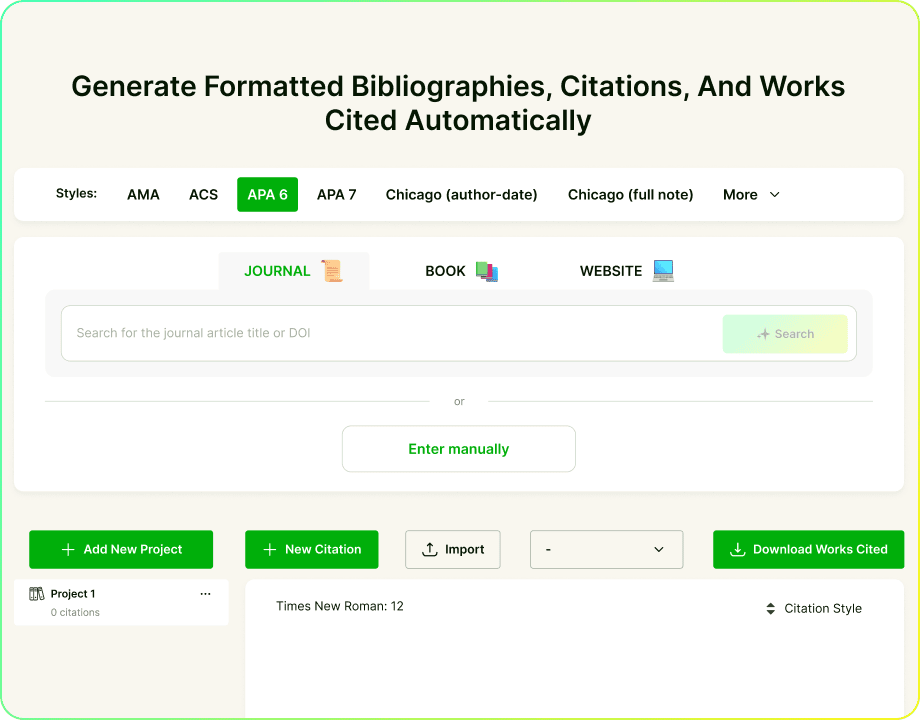
From Source Search to Reference List in One Citation Workspace
Source Data Before Citation Style
Search for a journal article by title or DOI, review the matched source, or enter the metadata manually. This gives you control when an author, publication date, volume, issue, page range, publisher, DOI, or URL is missing or incorrect.

Supports Multiple Citation Systems
Choose the citation style before adding source details so the fields and final format follow the same system.
Use APA 6, APA 7, MLA 8, MLA 9, AMA, ACS, Chicago author-date, Chicago full note, and other available styles.
Select journal, book, website, or another supported source type instead of formatting every source as the same kind of material.
Switch styles when assignment, publication, or professional requirements change, then review the reformatted source list.

Organizes Citations Into Downloadable Projects
Add citations to a project instead of keeping isolated entries. Review the complete bibliography, reference list, or works cited list for missing fields and inconsistent styles, then download it when the project is ready.
Search First or Enter It Yourself
Start with complete source data so the selected citation style can format the right author, date, title, publication, DOI, or URL.

Source Type Changes the Form
Journal, book, and webpage inputs keep the citation aligned with the material being cited.

Style Choice Comes Before Formatting
Select the required citation style before generating so each entry follows one system.

Group and Import Citations
Projects with many journal, book, and webpage sources need one place to collect, check, and organize them.

Download a Usable Source List
Finish with a source list that can be reviewed as one project, then download it in the format needed for the next step.

Metadata Still Needs a Human Check
Confirm names, dates, titles, publication details, DOI, and URL against the original source.
Citation Generator vs. Source Verification: What Must Still Be Checked?
A citation generator formats the information it receives, while source verification confirms that the information describes the exact work you used. A polished entry can still be wrong when the source match, metadata, version, or source type is incorrect.
Six Checks Between a Formatted Entry and a Trustworthy Citation
- Source identity: Confirm that the matched title, author, publication date, and DOI belong to the exact version you read rather than a similarly titled article, preprint, correction, or later edition.
- Source type: Distinguish a journal article from a webpage, book, chapter, report, or conference paper because each type requires different fields and formatting rules.
- Creator roles: Check author order, group authors, editors, translators, and organizations instead of placing every contributor in the author field.
- Version and style: Verify the required system and edition, such as APA 6 versus APA 7, MLA 8 versus MLA 9, or Chicago author-date versus full note.
- Container details: Confirm the journal or book title, volume, issue, edition, publisher, page range, and article number. A chapter entered as a book may omit its chapter author and pages.
- Identifiers and final match: Open the DOI or URL, verify that it reaches the same source, and make sure every in-text citation has a corresponding entry in the final source list.

Audit a Citation Project Before You Download It
Reviewing citations one at a time is not enough. A final project audit checks whether every entry uses the correct source type, complete metadata, one consistent style, and an identifier that leads back to the source.
The Source–Metadata–Style Audit

Set the Project Standard
Confirm the required style, edition, list type, and any instructor or publication rules.

Confirm Every Source
Open each original source and verify the title, creators, date, and version.

Check Source-Type Fields
Check the fields required for journals, books, and webpages instead of using one checklist.

Test Identifiers and Formatting
Test each DOI or URL, then review author order, capitalization, italics, punctuation, and numbering.

Match the Source List
Compare the downloaded list with the document so every cited source is represented.
Where Citation Errors Hide by Source Type
Each source type has its own high-risk fields. Review the fields most likely to be missing, misidentified, or assigned to the wrong part of the citation.
- Journal articles: Check author order, article title, journal title, publication year, volume, issue, page range or article number, and DOI.
- Books and chapters: Distinguish the chapter author from the book editor, confirm the edition and publisher, and include the chapter page range when required.
- Websites: Identify the individual or organization author, distinguish publication from update dates, use the page title rather than the site name, and link to the specific page.
- Multilingual sources: Preserve names and diacritics, verify transliteration, and follow the selected style for original titles, translated titles, and language notes.
- Discipline-specific styles: Keep numbered AMA, ACS, IEEE, and Vancouver entries in the required order, and do not mix Chicago notes with Chicago author-date references.
A citation is reliable only when the source identity, metadata, and selected style agree. Use the generator to format and organize the project, then use the original sources to verify every field that readers may need to locate the work.
Open the source before accepting a title or DOI search result with similar authors, dates, or wording.
Leave an uncertain field unresolved until you can verify it rather than inventing an author, date, edition, or page range.
Compare the downloaded source list with every in-text citation, footnote, or numbered reference before submission.
Need Help With the Next Part?
Move to the next step with tools for drafting, rewriting, checking, summarizing, and research.
 Outline GeneratorOrganize a topic into a practical structure before drafting.
 Introduction GeneratorDraft an opening around the topic, purpose, audience, and direction.
 Essay CheckerReview grammar, spelling, clarity, and sentence issues.
 Thesis Statement GeneratorTurn a topic and position into a focused central claim.
 Hook CrafterCreate opening lines suited to different topics, audiences, and formats.
 Conclusion GeneratorCreate a closing section from the claims and points already developed.
 ParaphraserRewrite text with controlled wording changes while preserving meaning.
 Essay EnhancerImprove clarity, flow, tone, and organization in an existing draft while keeping its core meaning.

Explore by Category
Writing
Citation Generator FAQ
Choose a citation style and a Journal, Book, or Webpage source type. Search by journal title or DOI or enter details manually, then create, group, import, review, and download citations.
Yes. Search for a source or enter its details, review the formatted entries, organize the list, and download it without paying. Signing in is useful when you want to manage references across a larger writing project.
Yes. Select the required style and the correct source type, then provide complete metadata. APA 7, MLA, and AMA all depend on accurate author names, titles, dates, publication details, page ranges, DOI, and URLs. EssayDone formats the entry, but missing or incorrect source data still needs to be fixed before you use it.
Yes. Search for a journal article by title or DOI, or enter the title, contributors, publication date, journal name, volume, issue, page range, DOI, and URL manually. Confirm that the matched record is the exact source and version you used before selecting Cite.
Compare the title, authors, publication year, journal, volume, issue, page range, and DOI with the source you actually used. If the result points to a preprint, early-view record, correction, or different edition, select the correct record or enter the metadata manually before generating the citation.
Yes. Use EssayDone as a citation tool to create and review individual citations, organize them into a bibliography, works cited list, or reference list, and download the result. Follow the heading, ordering, and punctuation rules required by the selected style.
Yes. A polished entry can still contain the wrong source match, source type, author order, date, title, publication details, DOI, or URL. Correct the metadata before judging the punctuation and formatting.
Yes. Citation Generator can handle sources written in other languages. Preserve author names, diacritics, original titles, and publication details, then follow the selected style's rules for transliteration or translated titles.
No. Formatting does not establish authenticity, peer review, relevance, currency, or suitability. Open the original record, confirm the publication and version, and check corrections or retractions when the stakes require it.
🔗 References
APA, MLA, Chicago, DOI, and metadata guidance provides the rules a citation generator must follow when identifying source type, completing fields, formatting entries, and assembling a reference list.

- APA Style|APA Style: Reference Examples
- MLA Style Center|Citations by Format
- The Chicago Manual of Style|Chicago-Style Citation Quick Guide
- Crossref|Crossref Metadata Retrieval Overview
- DOI Foundation|DOI Handbook