






Top 7 ChatGPT Free Version Limitations & Simple Fixes

The free version of ChatGPT is useful for everyday questions, studying, brainstorming, and light writing help. Still, ChatGPT free version limitations matter if you depend on it for long sessions, file-heavy work, images, or research projects.
Most limits exist to balance demand and keep the service available for many users. The exact caps can change by model, traffic, account type, and region, so treat any number as a snapshot and check your account notice when ChatGPT says you have reached a limit.
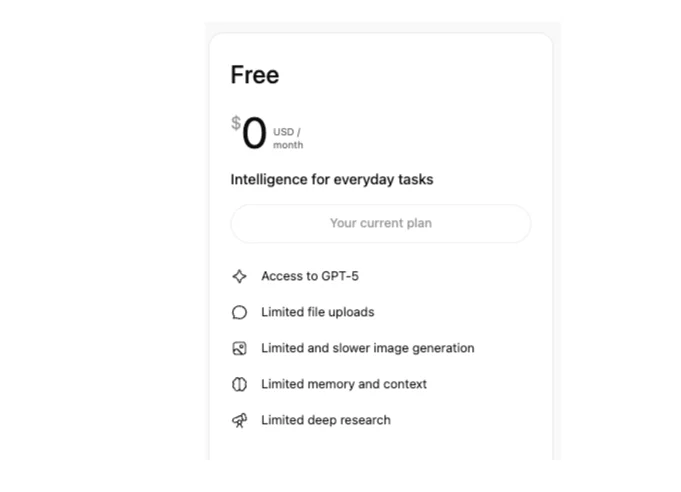
Where the ChatGPT Free Version Still Has Limits
1. Message Caps and Cooldown Periods
You can use ChatGPT on the free plan, but premium or flagship model access is limited.
OpenAI describes Free-tier access as limited within a rolling time window, and those limits may be dynamic rather than fixed forever.
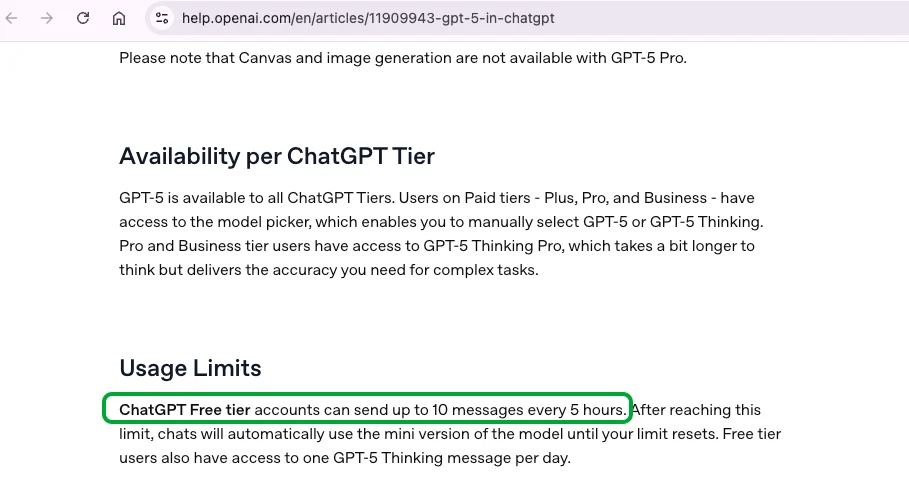
Once you reach a limit, ChatGPT may ask you to wait, switch the conversation to a lighter model, or invite you to upgrade. You can usually keep using ChatGPT, but the response quality, speed, or available tools may change.
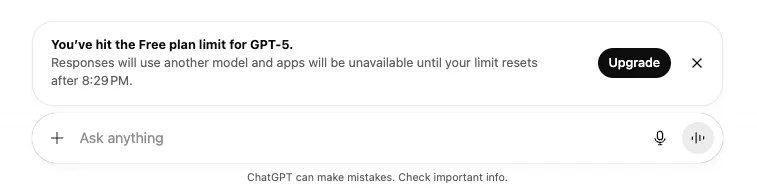
Reasoning or “thinking” style models may also have separate usage allowances, so save them for tasks that really need deeper planning or analysis.
Example:
If you are working through a long study session and hit a free-tier limit, finish the simplest questions with the lighter model and save harder research, coding, or essay-planning prompts until the window resets.
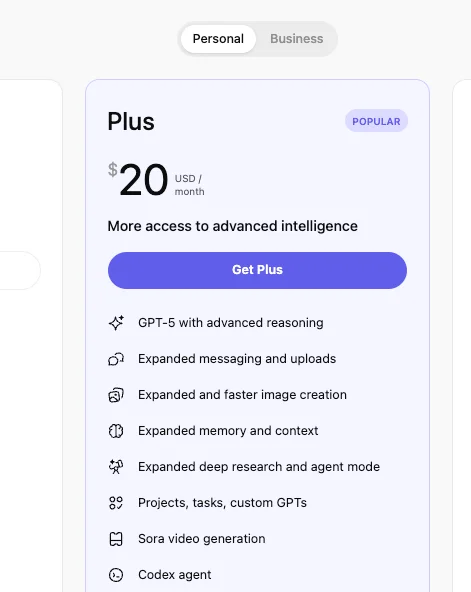
ChatGPT Plus provides more access and smoother usage for $20/month, while Business and Pro plans are built for heavier or team-based work. Exact model names and allowances can change, so always check the current upgrade screen before paying.
2. Limited Access to GPTs and Tools
Free users can try many ChatGPT features, but creation, advanced tools, and higher-volume workflows are usually more limited than paid plans.
For example, you may be able to use some GPTs, file uploads, image tools, or voice features, but usage caps and feature access can vary by account and rollout.
If you rely on ChatGPT for data-heavy or technical work, you will notice the difference fastest. Free access can help with quick questions, but longer file analysis, coding workflows, and repeated tool use are usually easier on paid plans.
3. Rate Limits on Images, Files, and Web Browsing
The free plan may include browsing, file uploads, image analysis, and image creation, but each tool has usage limits.
Image generation may pause after a small number of requests, especially when demand is high.
File uploads and image analysis can be limited by file count, file size, and system conditions.
Web browsing can also pause after repeated searches or when a feature is temporarily unavailable.
Paid users generally receive higher limits and more consistent access, but paid plans still have rules, safety limits, and system-condition changes.
4. Performance and Priority Access
Another difference you’ll feel is speed.
When servers are crowded, free users get placed in a queue or might see slower responses. Paying users (especially Plus or Business) are given priority access, meaning they get faster replies and fewer “please try again later” messages.
It’s a bit like flying economy versus business class—you’re going to the same place, but one line moves faster.
5. Smaller Context and Memory
Every chat has a context window, which means there is a limit to how much earlier conversation the model can use at once. On the free plan, long prompts, pasted drafts, or many back-and-forth messages can make ChatGPT lose track of earlier details.
For students, this matters when reviewing long essays, comparing many sources, or planning a large project. Keep one chat focused on one task, summarize key decisions as you go, and start a fresh chat when the topic changes.
6. Missing Premium Features
Some advanced features are limited, delayed, or unavailable on the free plan depending on the current ChatGPT lineup.
This may include higher reasoning allowances, deeper research tools, advanced voice access, larger file workflows, agent-style tools, or custom workspace features.
If your goal is academic writing rather than general chat, a dedicated writing workspace such as WriterGPT can be more focused for drafting, citations, and research organization.
7. Occasional Usage Delays or Restrictions
Because millions of people use ChatGPT for free, OpenAI sometimes enforces short pauses or restrictions when systems get overloaded. You might see a message saying your usage has been temporarily limited or that you should “try again later.”
This isn’t a bug—it’s just how OpenAI keeps the system stable for everyone.
Comparing ChatGPT Free, Plus, and Business Plans
Earlier, we covered the main ChatGPT free version limitations: message caps, tool limits, smaller context, and slower access during busy periods. Here is a safer way to compare the plans without relying on exact limits that may change.
Feature | Free Plan | Plus Plan ($20/month) | Business Plan ($25/user/month) |
Model Access | Limited access to current models | Expanded model access | Workspace model access for teams |
Message Limits | Dynamic limits and cooldowns | Higher limits than Free | Higher team-oriented limits |
Speed & Priority | May slow during busy times | More reliable access | Built for workplace use |
Web Browsing | ✅ Available when included, but capped | ✅ Higher access when available | ✅ Workspace controls may apply |
File Uploads & Data Analysis | Limited uploads and processing | More room for file work | Team-level file workflows |
Image Creation (DALL·E) | Limited image generation | Higher image limits | Expanded team access |
Custom GPTs | Can often use GPTs | More creation and use options | Shared workspace GPTs |
Memory & Context | Best for shorter tasks | Better for longer work | Workspace memory controls |
Voice Mode | May be limited by rollout and plan | More voice access | Workspace policy may apply |
Deep Research & Agent Mode | Limited or unavailable | Available with plan limits | Expanded for workplace use |
Sora Video Generation | Limited or unavailable | Plan and rollout dependent | Workspace availability may vary |
Codex (Code Agent) | Limited or unavailable | Access depends on current plan terms | Workspace access may be included |
Security & Privacy | Personal account settings apply | Personal account settings apply | Business workspace controls |
Use Case Fit | Light personal use | Frequent personal or creative use | Team collaboration and business workflows |
Making Sense of It All
If you think back to what we covered earlier—the message limits, image caps, and reduced memory—those are exactly what the paid plans expand or remove.
Plus is for people who hit those walls often and want a smoother, faster experience without the “wait to reset” messages.
Business goes a step further, turning ChatGPT into a secure, collaborative workspace for teams that handle data, projects, and creative work together.
Free, meanwhile, stays a great entry point for casual users or anyone just starting to explore what ChatGPT can really do.
How to Work Around ChatGPT Free Version Limits
Even though the free ChatGPT comes with some restrictions—like message caps, image limits, and smaller context windows—you don’t have to feel stuck. There are smart ways to make the most of your free tier without constantly hitting walls. Let’s break them down.
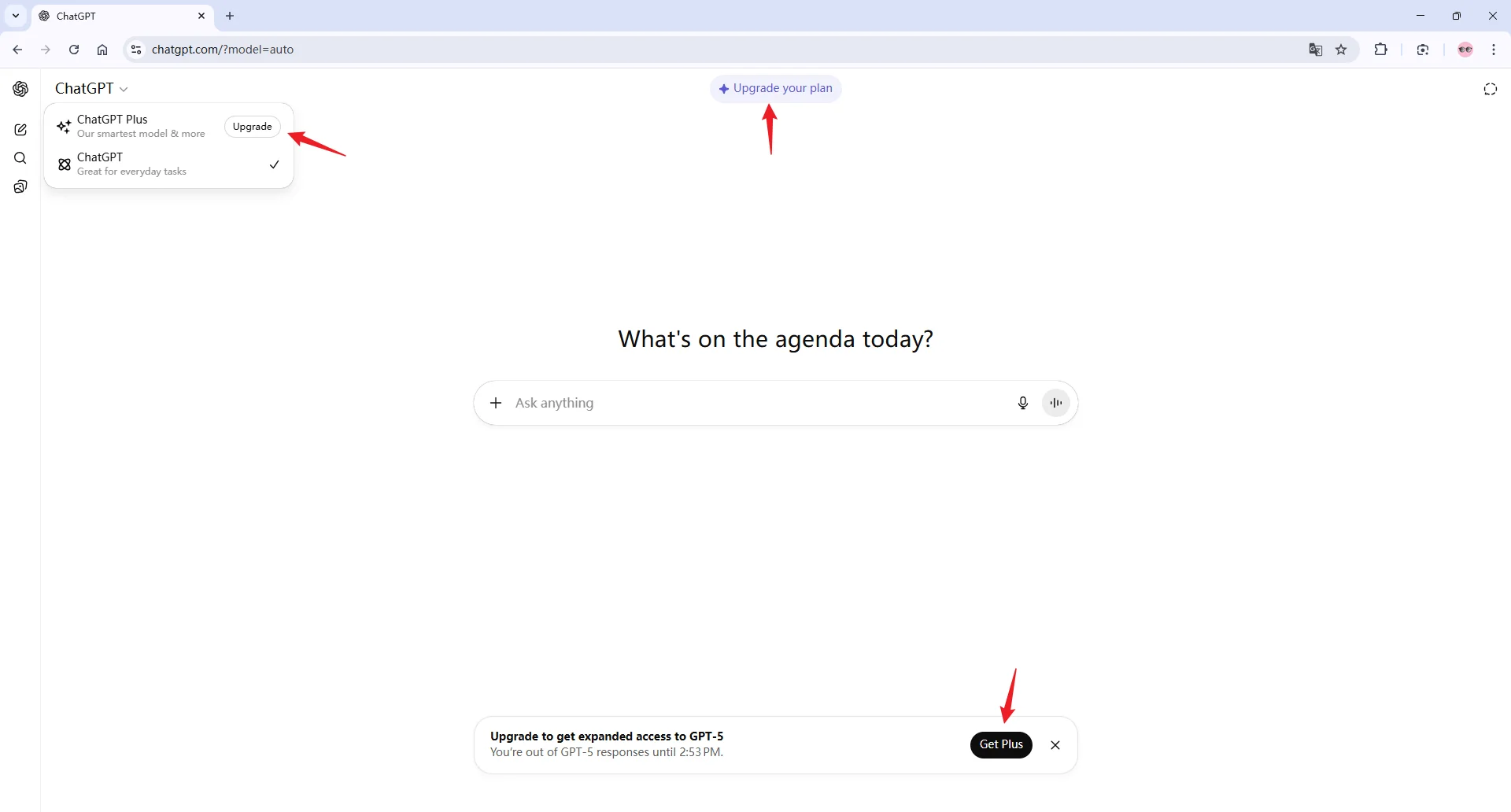
1. Upgrade Your Plan
The most direct way to reduce free-tier limits is to upgrade.
What it does: Moving to Plus, Pro, or Business usually gives you higher limits, faster access, and more tools than the free plan.
How it works: After upgrading, your available features and limits follow the new plan, though plan limits and tool availability can still change.
My take: Upgrade only if you regularly hit limits during work, school, research, or creative projects. For occasional questions, the free plan may be enough.
2. Draft Prompts Externally
What it is: Instead of typing long prompts directly in ChatGPT, write and refine them in a text editor first.
How it helps: You can make your questions clear and concise, which uses fewer tokens and avoids unnecessary follow-ups.
My tip: Think of it like packing efficiently before a trip—you fit more into the same “space” without wasting resources.
3. Use GPT-4o or Mini for Less Critical Questions
What it is: When you hit limits, ChatGPT may switch to a lighter model or ask you to wait.
How it helps: Save your strongest available model access for harder tasks, and use lighter responses for definitions, brainstorming, or quick rewrites.
My tip: Treat model names as temporary. The exact names may change, but the strategy stays the same: match the task to the amount of reasoning it needs.
4. Split Complex Tasks into Smaller Pieces
What it is: Instead of asking one massive question, break it into smaller, manageable chunks.
How it helps: Each smaller request uses fewer tokens and reduces the risk of hitting limits mid-task.
My tip: For example, if you want a blog outline, first ask for section headers, then ask for details for each section separately.
5. Time Your Usage Wisely
What it is: Free-tier performance can fluctuate depending on server load.
How it helps: Using ChatGPT during off-peak hours may slightly improve speed and access to tools.
My tip: Early mornings or late evenings often have lower traffic than busy daytime hours.
6. Clear Conversations and Start Fresh When Needed
What it is: Old chats take up some of your context memory, which can indirectly affect performance.
How it helps: Starting new chats for unrelated topics keeps the AI focused and efficient.
My tip: Think of each chat as a “clean desk”—don’t mix unrelated projects in the same session.
7. Be Specific and Concise
What it is: Well-crafted prompts save tokens and reduce unnecessary follow-up questions.
How it helps: Clear instructions get you better answers faster and extend your free-tier usage.
My tip: Include key details upfront—like tone, style, or format preferences—so ChatGPT doesn’t need multiple iterations to get it right.
What the ChatGPT Free Version Can Do
If you have not used ChatGPT in a while, the free version can still be surprisingly useful. Depending on your account and current rollout, it may support web search, file help, image understanding, GPTs, and image generation, but each feature can have limits.
1. It can browse the web.
When search is available, you can ask about recent information and request sources. Still, double-check important details, especially for academic, legal, medical, or financial topics.
2. It can look at your files and data.
You may be able to upload a file and ask for summaries, patterns, or explanations. For larger writing projects, keep your source notes organized outside ChatGPT so you do not lose work when limits reset.
3. It understands images.
You can upload images such as charts, screenshots, or designs and ask what they show. Results can be useful, but you should verify details that affect grades, business decisions, or safety.
4. It connects you with custom GPTs.
Custom GPTs can help with writing, studying, planning, coding, and other focused tasks. Access and tool use may vary by plan.
5. It creates images from your ideas.
Image generation can help with quick concepts or visual brainstorming, but free-tier image limits may appear quickly. If AI-written text starts to sound repetitive, Humanizer can help revise wording so it reads more naturally.
Common ChatGPT Limitations You Should Know About
Even the smartest AI has its quirks. Here’s a quick look at some general limitations you might encounter when using ChatGPT—beyond the free-tier restrictions we discussed earlier.
Limitation | What It Means |
1. Fact Accuracy | ChatGPT can sometimes provide outdated, incomplete, or incorrect information. Double-check important details. |
2. Built-In Bias | The AI reflects patterns from its training data, which can unintentionally produce biased answers. |
3. Logic Gaps | The model may make statements that don’t always make sense or align with real-world reasoning. |
4. Sensitive Content Risks | It can generate content that is inappropriate or ethically tricky if not guided carefully. |
5. Occasional Language Errors | Grammar and spelling are usually strong, but mistakes can appear, especially with complex inputs. |
6. Partial Answers | Long or complicated prompts may result in responses that miss key details. |
7. Predictable Creativity | AI-generated ideas may feel formulaic or less imaginative compared to human creativity. |
8. Short-Term Memory | ChatGPT may forget details from earlier in the conversation if the context is long. |
9. Language Limitations | Works best in English and may struggle with less common languages or mixed-language prompts. |
10. Offline Knowledge | It cannot access the live internet by default; web browsing must be enabled separately. |
11. Specialized Knowledge Gaps | Niche or technical topics may not be fully accurate or up to date. |
12. Data Privacy Cautions | Conversations are processed on OpenAI servers, so sensitive info should be handled carefully. |
13. Visual Output Limits | Image generation is available but quality varies and daily limits apply for free users. |
14. Emotional Neutrality | The AI does not truly feel or understand emotions, so its responses are unemotional. |
15. Usage Limits | Free-tier limits and token restrictions can restrict how much you can do in one session. |
ChatGPT Free Tier FAQ
Q: Is performance for GPTs different for Free tier users?
A: Yes. Free users may be able to use GPTs, but advanced functions such as data analysis, file uploads, image generation, and longer tasks can be more limited than paid tiers.
Q: How many ChatGPT messages can I send per day on the Free tier?
A: OpenAI describes free-tier model access as limited within a rolling time window, and the exact number can vary. ChatGPT will usually notify you when you reach a limit and tell you when access resets or changes.
Q: Is there a way to track my remaining Free tier messages?
A: Yes. ChatGPT displays limit notices when you reach a cap, and those notices are more reliable than old blog posts because limits can change.
Conclusion
Okay, that’s all about the ChatGPT free version limitations.
We’ve covered message caps, tool restrictions, memory limits, and common AI quirks, plus some tips to make the most of your free access.
While it’s powerful, it’s designed for light use, and paid plans unlock much more. Now that you know what to expect, you can use ChatGPT smarter and avoid hitting those limits too quickly.