






DeepAI Review: Tested Features, ChatGPT Comparison & More

DeepAI is a browser-based collection of AI chat, image generation and image-editing tools, with video, music and other creative features. Open the official DeepAI site to use them; this page is an independent review based on the writing, image, video and music examples below.
If you want to try the chat first, open AI Chat, leave the model on Standard and enter a short question. The image generator and Photo Editor have their own entries in the navigation. A new image starts with a text prompt; editing starts with an existing image and an instruction about what to change.
We explore DeepAI in our guide as comprehensively as possible, analyzing its features and performance. Our hands-on test results help you decide if it’s the right tool for your creative needs.

DeepAI Overview: Features and Pricing
DeepAI is an AI-powered platform that provides a suite of tools for artists, researchers, and hobbyists to create images, videos, music, and interactives.
Core Features of DeepAI
AI Chat: A chatbot for various tasks, such as creating an essay outline, brainstorming ideas, improving sentence structure, conducting research, and generating summaries. It can adapt to different personalities and modes, tailored to your specific needs.
Image Generation: Produce visual media from written text. Pick from 100+ different models and add-ons like colorization and background removal for image resolution.
AI Video Generation: Turn text or a source image into video, with HD and Hollywood modes on the current Pro plan. The short robot clip shown later is the output of our original test, not the maximum duration of every current video mode.
AI Music Generator: Produce unique music or sound effects with simple text prompts, perfect for adding background music or custom soundscapes to your projects.
Pricing Structure
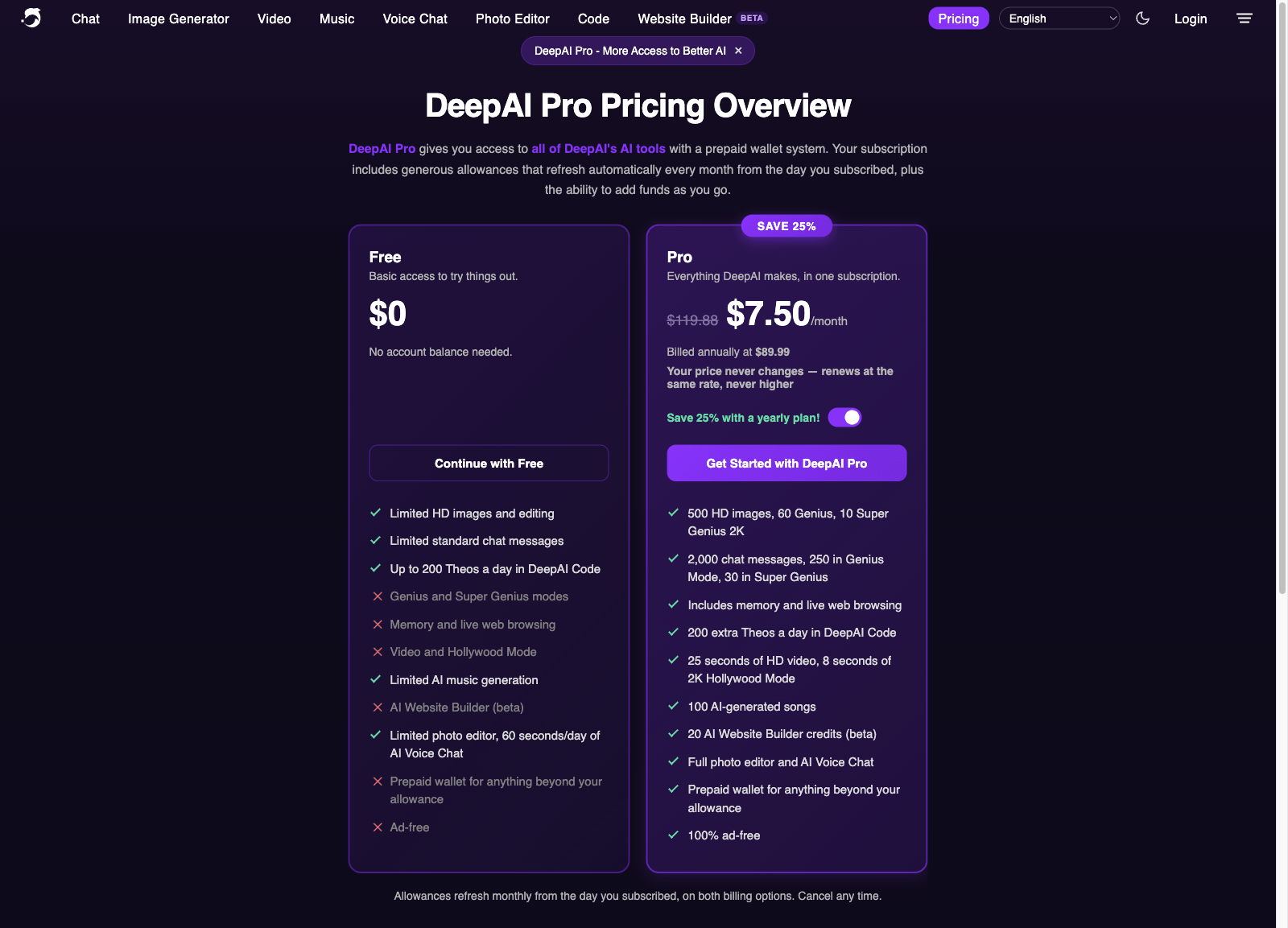
Free: limited Standard chat, HD image generation and editing, limited music and 60 seconds of Voice Chat per day. The plan comparison reserves Genius/Super Genius quotas, web browsing, memory, video and ad-free use for Pro. Free access is a way to try a task, not unlimited use of every model.
DeepAI Pro: 9.99 USD per month or 89.99 USD billed annually—about 7.50 USD per month. Both billing options refresh usage monthly from the subscription date. Included allowances are 500 HD images, 60 Genius images and 10 Super Genius 2K images; 2,000 Standard chat messages, 250 Genius messages and 30 Super Genius messages; 25 seconds of HD video, 8 seconds of 2K Hollywood video and 100 songs. Image and chat allowances are separate, not one pool of “60 Genius uses.”
Extra use draws from a prepaid wallet. The current rates include 1 USD per additional 100 HD images or 350 Standard messages. For example, 600 HD images in one cycle use the 500 included images plus 1 USD from the wallet. This replaces the old 4.99 USD subscription and “5 USD per use” description; a wallet top-up is not a charge of 5 USD for a single prompt.
DeepAI vs. ChatGPT: Which One for Your Task?
Our original tests below compare DeepAI and the version labelled ChatGPT 4.0 for writing, and DeepAI with Midjourney for images. They are historical observations. The three tasks here connect that evidence with current tool capabilities; they are not a new head-to-head test of today’s models.
1. Research a question, then make an outline
Use the original topic, social media and college students’ mental health, but ask for a narrower job: “Turn this topic into one research question. Separate possible mechanisms from established findings, propose an outline and link sources for each factual claim.” Our original writing test found structured outlines and fairly complete drafts from both tools; it did not verify every factual statement. DeepAI’s live browsing is a Pro feature. ChatGPT also supports web search, so current research should be compared on the sources retrieved and whether the answer accurately represents them, rather than on which draft sounds more confident.
2. Generate the background for a promotional poster
Our tested cyberpunk-city prompt is suitable for a poster background: it specifies a setting, sunset, skyscrapers and flying cars. In that comparison, Midjourney supplied more detail than DeepAI. For a real brief, add the required aspect ratio and leave clear space for the event title, date and venue. Current ChatGPT can generate and edit images too, but this article has no matching ChatGPT image test. DeepAI is worth trying for a quick concept; the existing test supports neither a current ChatGPT win nor a print-ready poster with accurate text.
3. Make one change to an existing image
Upload the city image to DeepAI Photo Editor and specify a local change: “Remove the flying cars; keep the skyline, camera angle, sunset colors and blank title area.” The editor accepts an image or URL and a text instruction; its documentation also describes using up to three reference images. ChatGPT can likewise take an uploaded image as an editing reference. Our original review examined DeepAI’s image tools but did not perform this same edit in both products. For this task, the useful comparison is whether the requested objects change while buildings, lighting and text remain intact. The same-image editing comparison remains a future test, not a result invented for this review.
Before Paying: Compare the Work, Not Just the Output
The three task examples above show where each tool fits. For a purchase decision, retain the prompt and usable result, then record the processing time, manual edits and failures in between. For images, include whether revisions preserve the intended objects and what usage rights apply. For video, keep unused variations in the cost record as well as the finished clip. A quick demo does not show the cost of repeating the work.
| Test | What to check | Evidence to record |
|---|---|---|
| Core workflow | Complete a real chat, image-generation or image-editing task with a clear prompt and repeat it only as necessary to reach a usable result. | The original prompt, processing time, steps, failed attempts, usable output and manual work required. |
| Quality | For writing, check the answer against the question and original sources. For images, verify that requested objects, composition and intended style survive the edit. | Source passages, original image when applicable, final output, missing facts, changed meaning, weak sentences and corrections made. |
| Boundary case | Use a longer or more detailed prompt within the advertised limits and check what happens when the image or video task needs another variation. | Incomplete or inconsistent output, the point where size or credit limits interrupt the work, time lost and repeat attempts. |
| Plan fit | Compare free/trial allowances against the current paid plan for the task you actually need, distinguishing chat/image credits from HD and Hollywood video seconds. | Price, included seconds or credits, overage charges, renewal and cancellation terms, and the cost of unusable variations. |
| Risk check | Check source handling, privacy terms, relevant content policy, image and music usage rights, and unsupported claims about results. | Input data, applicable rights, policy limits, unresolved permissions and any claim that still requires verification. |
Decision Checklist
Can you reproduce a useful result on your own material, not only the provider's demo?
How much editing is needed before the output is accurate and ready to use?
Does the tool preserve citations, quotations, formatting, and intended meaning where relevant?
Are current price, limits, data handling, refund terms, and cancellation steps acceptable?
Writing Test: DeepAI Chatbot Standard Mode vs. ChatGPT 4.0
Testing Method:
In order to compare the functions of the chatbot from DeepAI and ChatGPT 4.0, we will have the two programs perform the same assignment.
For this original test, we used DeepAI Standard and the ChatGPT version identified in the saved comparison as “ChatGPT 4.0.” That is the setup of the historical experiment, not a description of the current free ChatGPT model or plan. The same assignment and the output screenshots are retained below.

Prompts:
As an experienced essay writer, you are tasked with creating a comprehensive and well-structured outline for your essay on the topic of "The Impact of Social Media on College Students' Mental Health.
Output:
DeepAI and ChatGPT each produced a well-structured outline and a fairly complete article. Given that they are the free version, and of comparable quality of content, they are about the same.
DeepAI:

ChatGPT:

Grammarly Score
ChatGPT:

DeepAI:

AI Score: Can DeepAI Bypass AI Detectors?
We tested the output articles in EssayDone AI detector, and found that all the ChatGPT and DeepAI output were detected by EssayDone’s AI detector, meaning the content source would struggle to pass as human-written.
DeepAI:

ChatGPT:

Using GPTZero as an example:
DeepAI AI Score: 98%AI

ChatGPT AI Score: 99% AI

Additional Features of DeepAI’s AI Chat:
Copy Button: To copy your generated text with a single click, though pastes with formatting residues (e.g. "##").
Humanize: A setting for making AI text less recognizable and more natural-sounding and human-like.
Summarize: Takes the generated content and makes it shorter.
Provides the option to delete the conversation history.
DeepAI offers a variety of AI chat modes, including:
AI Text Generator
Math AI
AI Debate
AI Drunk Friend
AI Poem Generator
Translate
AI Comedian
AI Storyteller
Free ChatGPT
ChatGPT Alternative
GPT Chat
AI Relationship Coach

AI Image Generator vs. Midjourney
DeepAI’s image generation tool provides a straightforward, user-friendly way to make art by turning text into pictures. This tool has a wide variety of styles to choose from including Pop Art, Steampunk, Fantasy World, and over 100 other styles. However, the quality of the generated images is somewhat basic compared to more advanced tools.
Testing Method:
To compare these two services, we entered the same prompt, "A futuristic cityscape unfolds at sunset, featuring towering skyscrapers and flying cars, all set in a vibrant cyberpunk style." into both DeepAI and Midjourney, and assessed for image quality.
DeepAI Image Generator: Quality and Features

DeepAI's image generation tool is easy to use and provides quick results, but the quality of the images is somewhat lacking. HD mode’s picture quality and detail is poor.

However, it does provide a few helpful features for improving the generated images:
Super Resolution: Makes the pictures more sharp, more clear, but not as super cool as Photoshop.
Shaders: Increase image depth through base tinting for more visual interest.
This tool is a simple and efficient option for removing backgrounds, but it's not as precise as Canva.
Animate: Basic animation of images with motion or interactivity.
Zoom out/Expand Image- Allows users to enlarge an image’s canvas to display a broader scene.
Comparison with Midjourney

Comparing the image output of DeepAI with Midjourney when given the same prompt, we noticed:
Image Quantity: DeepAI provides just one result per prompt, while Midjourney generates multiple options (typically four).
Image Clarity: Midjourney’s images were noticeably more detailed and visually rich than DeepAI's, offering a higher level of clarity and realism.
Quality: Midjourney’s images are more refined, with better handling of lighting, shadows, and intricate details, while DeepAI's images, although fast and accessible, have a more simplistic look.

Video Testing
Prompt: A robot dancing to electronic music with neon lights
The video generator by DeepAI takes photos or text and transforms them into a video. In our test, it produced a two-second video.
Unfortunately, the video wasn’t well-animated or detailed. Still, the tool’s speed and ease of use make it a good option for users who want a quick video without any heavy editing.

Is Pro enough for a short video? Under the current published allowance, two eight-second HD clips use 16 of the 25 included seconds in a billing cycle. A third takes the total to 24, leaving one second. A fourth eight-second clip exceeds the allowance by seven seconds; at $0.20 per extra HD second, that uses $1.40 from the prepaid wallet.
Hollywood Mode has a separate eight-second 2K allowance, with extra seconds costing $0.30. It is not a free upgrade for every HD clip. This is an allowance calculation, not another generation test: the original two-second robot result above remains evidence of the version tested then. Generating variations consumes duration too, so four attempts can cost more than one usable clip.
AI Music Generator Test
Prompt: 115 BPM disco with groovy bassline
The AI music generator at DeepAI is another impressive aspect to the service. You can make music tracks or sound effects with just a text prompt. In our test, the music was made quickly and there were no problems downloading and sharing.
The track I chose was a 115 BPM disco track with a groovy bassline. It wasn’t great, but it accomplished what I needed it to. I would recommend generate as a resource for people who need quick music or sound effects for their projects, and don’t require very clean audio.

Pros and Cons
Conclusion on Test: Writing, Image, and Other Tools
In our review of DeepAI’s platform, we determined that DeepAI is a very accessible and fast option for content creation. The platform supercharged generation of several types of content, including text, image, and even music and video. AI Chat and Image Generator were the fastest tools, offering valuable results, though the quality of content output was usually only basic.
The accessible nature of DeepAI’s platform makes it a great option for beginners, or users looking for fast, budget-friendly resources for a project, especially because there is free access to core features. However, DeepAI’s output quality, particularly for high-detail image generation, doesn’t quite stack up to Midjourney’s. The other tools for music and video generation function just fine, but are similarly more suited to creating basic content rather than high-quality productions.
Other Pros and Cons
Pros:
Versatile Toolset: Provides a variety of AI tools for text, image, video, and music generation.
Fast Speed: Quick results for content generation (best for when you’re in a rush!)
Free Accessibility: A free plan that works well for the beginners for basic necessity.
Genius Mode Feature: Get the best results in text and image creation for advanced users.
Cons:
Image detail: our cityscape comparison showed less refined detail and lighting than the Midjourney result.
Video control: the original dancing-robot clip was only two seconds and lacked convincing movement. That describes our saved output, not a limit of the current subscription.
Writing evidence: a complete-looking outline is not source verification. The original 98% and 99% AI scores also do not measure factual accuracy or grammar.
Metered use: Pro has separate monthly allowances. Repeated images or premium-model conversations can draw from the prepaid wallet after those allowances are exhausted.
FAQ

Can you detect DeepAI with an undetectable AI tool?
Yes, you can still detect outputs from DeepAI with AI detection tools. Although some of the features such as the Genius Mode improve its quality, it can still be detected as AI-generated.
Can Teachers Detect DeepAI?
Teachers may be able to detect DeepAI-generated content by noticing inconsistencies in writing style, depth, or overall quality. While platforms like Canvas may integrate AI detectors, such as Turnitin or others, to flag DeepAI content. Additionally, teachers familiar with the student's previous work may still spot differences that prompt further investigation.
What is DeepAI Genius Mode?
DeepAI Genius Mode is the next step up from the DeepAI AI Chat. It has better knowledge, less errors, more reasoning, and more conversation capability than the AI Chat. However, as an upgraded version, this tool utilizes a larger AI model and requires a DeepAI Pro subscription.
Does DeepAI offer API integrations?
Yes, DeepAI provides several APIs for different AI and machine learning tasks, including:
Text to Image: Converts text prompts into images.
AI Image Editor: Enhances and adjusts images.
Super Resolution: Upscales and clarifies images.
Additional APIs are available for colorization and various text-to-image styles.
The API documentation provides HTTP endpoints with API-key authentication and examples for several programming languages. Pro API generations draw from the relevant monthly allowance or prepaid wallet. Image generation, editing and video have different usage units; the old blanket “5 USD per 100 calls” is not a current price for every endpoint.
Does DeepAI cost money?
DeepAI is free to generate text and images. However, to unlock all AI chat modes and advanced options, you must make a modest single payment or pay for an affordable subscription each month.
Is DeepAI better than ChatGPT?
For a quick image concept or access to several creative tools in one place, DeepAI is a useful starting point. For research, compare actual sources and document handling; for image editing, compare preservation of the original image. Our saved outline and Midjourney tests do not establish that either product wins every current task.
Conclusion
In all, DeepAI is a good, beginner-friendly resource for anyone interested in dabbling with AI.
DeepAI is an excellent and user-friendly alternative for anyone wanting to try out AI-generated content.
Choose it for the task that matches the evidence: a quick chat draft, an accessible image concept, or a lightweight creative experiment. If an image must retain exact product details, or a research answer needs dependable citations, budget for checking and editing the output. The original examples show what needed work, while the current pricing section explains what each attempt consumes.
High-end users might want to go to pricier programs, but DeepAI is affordable and straightforward to navigate, making it an excellent choice for beginners and those in need of simple, quick AI help.