



RyRob AI Detector Review: How Well Does It Spot AI Writing?

RyRob AI Detector is one of the tools many writers and students turn to for checking AI-generated text.
You might be wondering how accurate it really is and whether you can trust its results.
In this article, we test it on different types of text and break down its performance, giving you an objective look. We also compare it with other popular AI detectors so you can see how it stacks up. Let’s dive in.
What is RyRob?
RyRob is a website created by Ryan Robinson, a blogger and content strategist who shares resources for writers, marketers, and creators.
Over time, the site has grown into more than just a blog — it now includes a full set of free AI writing and SEO tools. You can find tools for writing blog posts, fixing grammar, generating outlines, doing keyword research, and more. It’s basically a one-stop toolkit for people who write or create online content.

What is RyRob AI Detector?
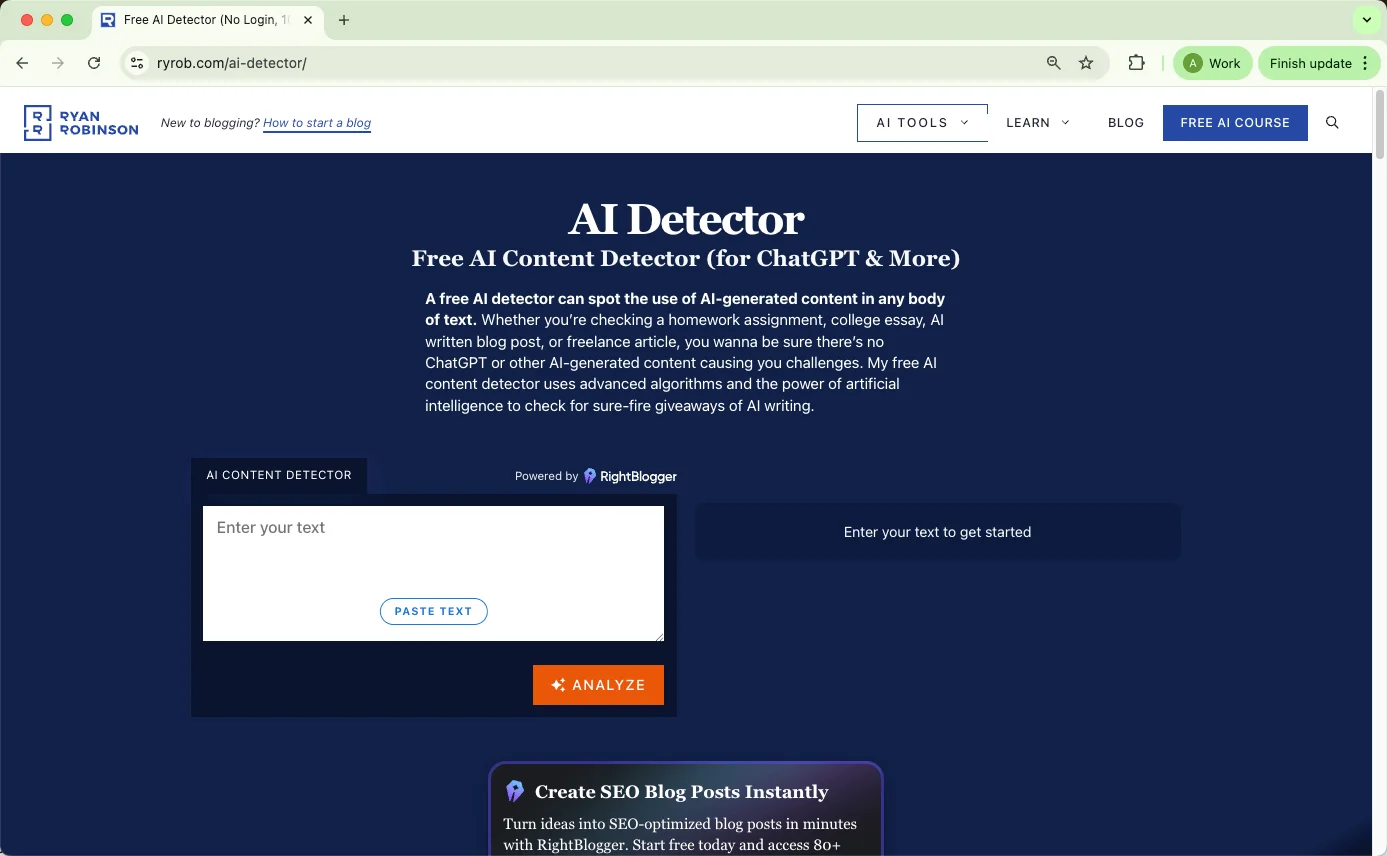
Among those tools is the RyRob AI Detector, a free online tool designed to check if a piece of writing was generated by AI. It’s simple to use: you paste your text into the box, click the button, and it gives you a percentage score showing how likely it is that the text was written by a human or an AI.
The detector shows results like this:
100%: Human-written or fully rewritten by a person
80–99%: Mostly human-written
60–79%: Mixed human and AI content
40–59%: Unclear mix
20–39%: Probably AI-written
Below 19%: Almost certainly AI-generated
It doesn’t require sign-up, supports English text, and works directly in the browser — no uploads or API keys needed.
How Accurate is RyRob AI Detector
According to RyRob’s official description, its AI Detector uses “advanced algorithms and the power of artificial intelligence” to find telltale signs of AI writing. It’s marketed as a free tool that can help teachers, editors, or freelancers spot AI-generated text from tools like ChatGPT. The claim suggests that it can reliably detect whether a piece of writing is human or AI-produced.
To find out how accurate that claim is, I ran three small tests: one with pure AI text, one with a mix of human and AI writing, and one with AI text that had been “humanized” using QuillBot. Each test looked at how RyRob scored the text and how well those results matched what I actually knew about the samples.
Test 1: Pure AI Text
Setup:
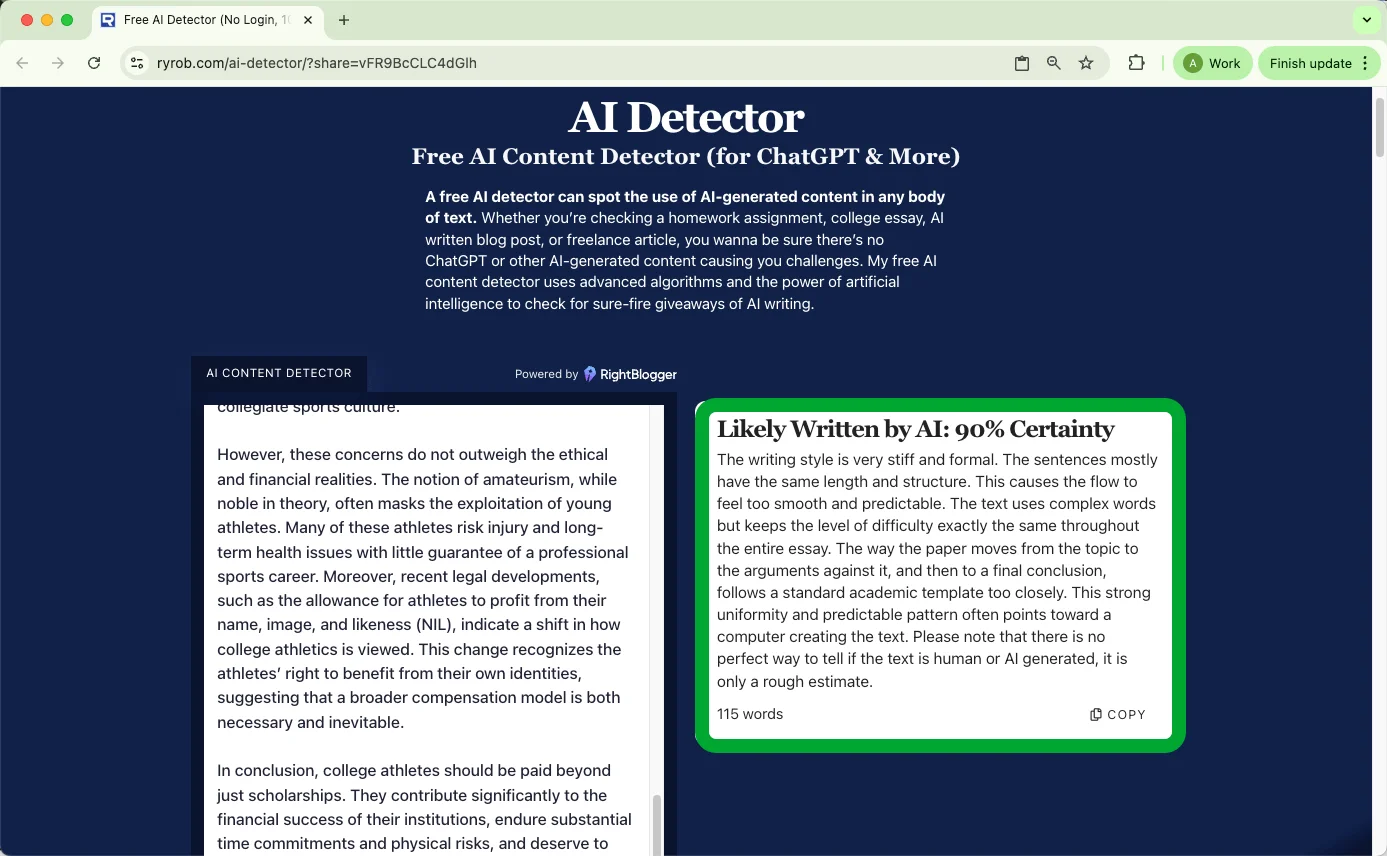
For this test, I generated a short essay using ChatGPT-4 without any human editing. The goal was to see if RyRob could correctly identify it as AI-written.
Results:
RyRob labeled the sample as “Likely Written by AI: 90% Certainty.”
Observations:
This result was accurate. The detector clearly picked up on the uniformity and polished rhythm typical of AI writing. The explanation text was a bit general but matched what most AI detectors look for — consistency, symmetry, and overly smooth flow. Overall, RyRob’s judgment here was reliable.
Test 2: Mixed AI + Human Writing
Setup:
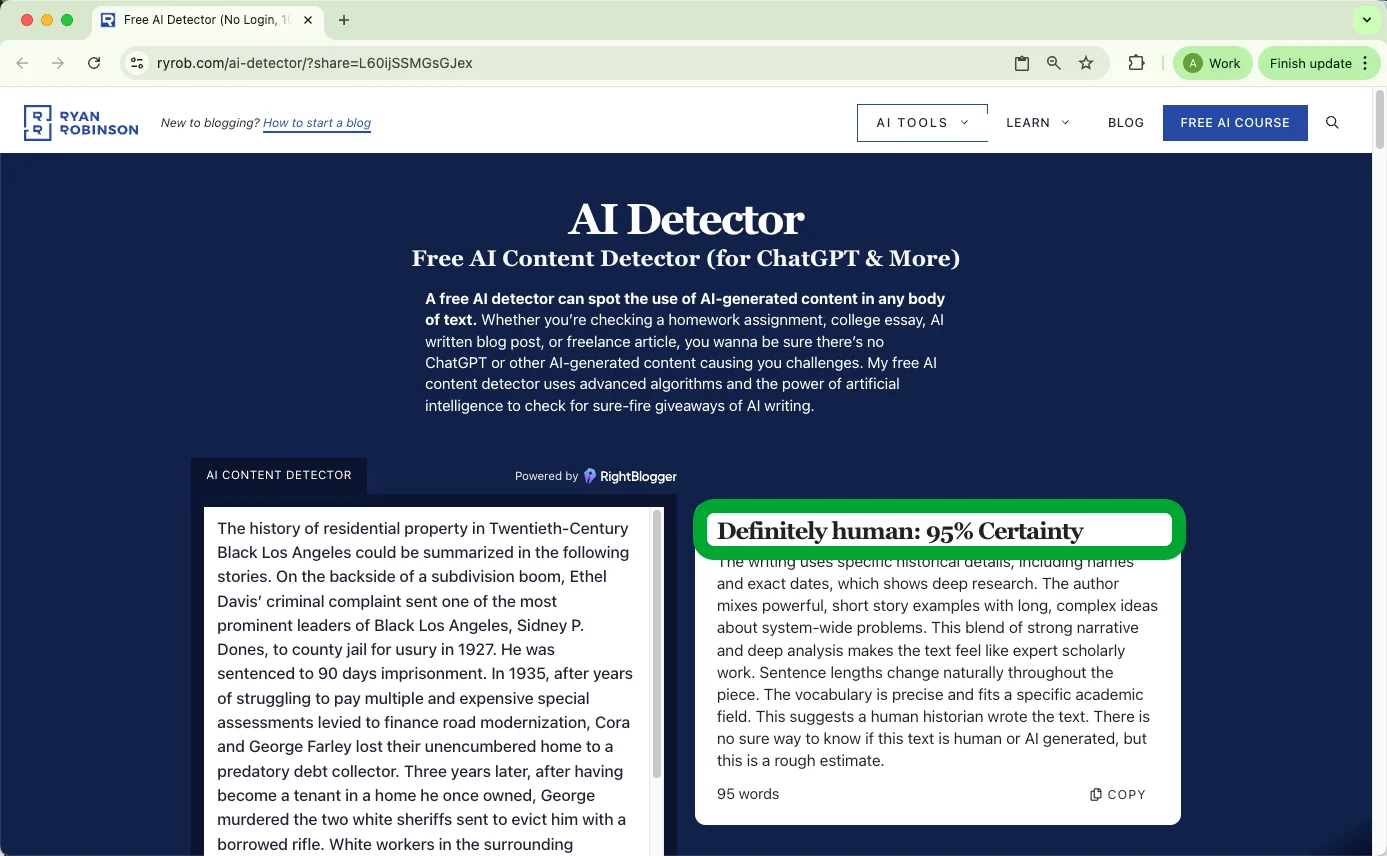
Next, I used a paragraph written before ChatGPT existed — a clearly human-authored essay section — and then asked ChatGPT-5 to continue it. The final piece contained about 41% human writing (187 words) out of 454 total.
Results:
RyRob’s result was “Definitely human: 95% Certainty.”
Its reasoning was that the text included specific historical details, varied sentence lengths, and nuanced arguments, which all made it read like serious academic writing. The tool highlighted that the vocabulary and tone were consistent with an expert human author.
Observations:
This one was less accurate. The passage was partly AI-written, yet RyRob marked it as almost completely human. It seemed to rely heavily on stylistic cues rather than deeper content analysis. The detector appears to reward variation and specificity — features that an AI continuation can easily mimic. For mixed texts, its confidence score seems too generous toward “human.”
Test 3: Humanized AI Text by QuillBot
Setup:
For the final test, I took the same 100% AI-generated text from Test 1 and ran it through QuillBot’s advanced “Humanizer” mode. This tool rephrases sentences to make AI writing sound more natural.
Results:
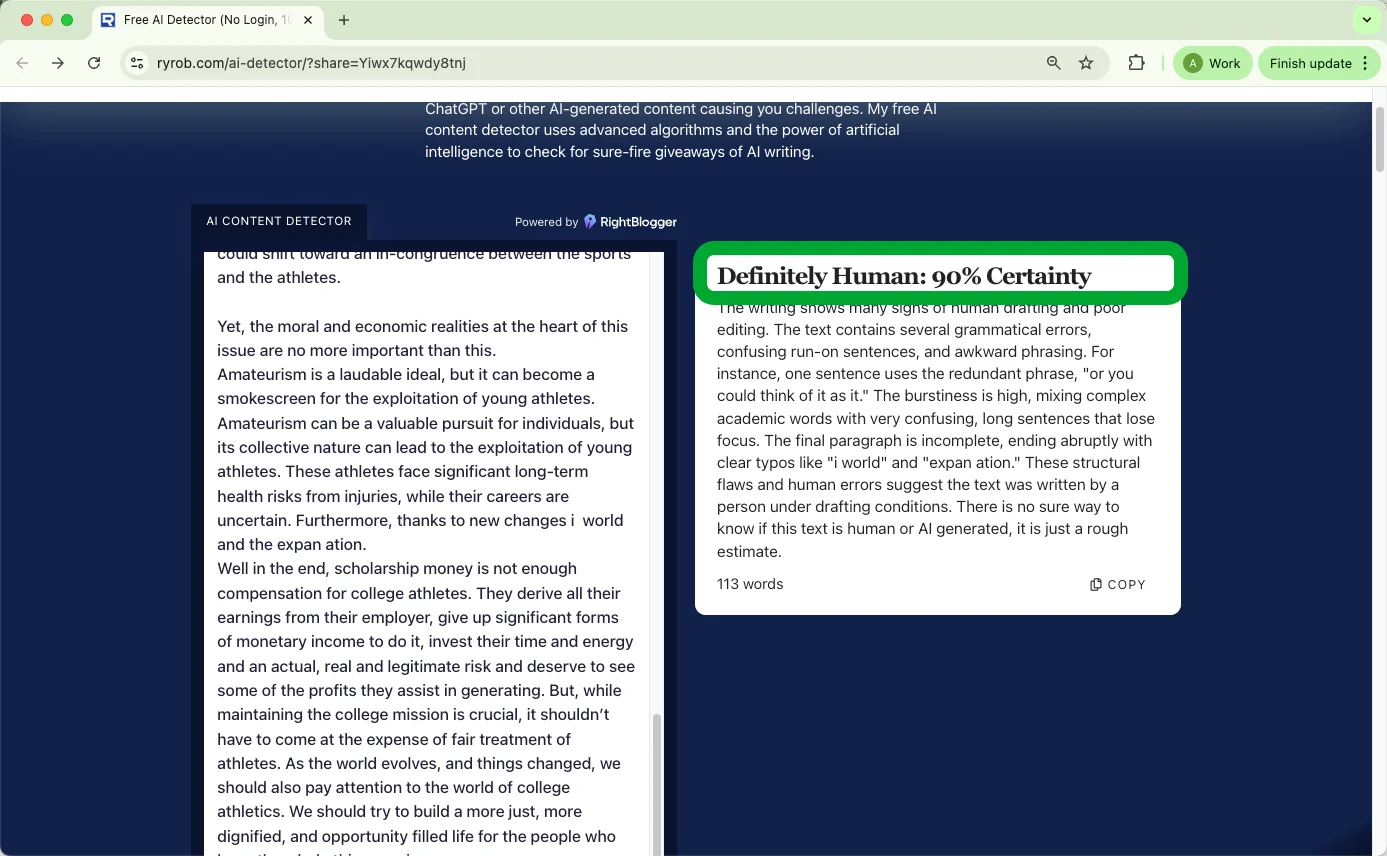
RyRob marked it as “Definitely AI: 90% Certainty.”
The reasoning mentioned that the text followed a perfect essay structure with overly uniform sentences and predictable transitions. It noted that the writing was too consistent, using standard phrasing and transitions between ideas — all signs of automated text.
Observations:
Interestingly, RyRob didn’t get fooled by the QuillBot version. Even though the language was rewritten, it still recognized the mechanical flow and structure. This suggests that RyRob’s algorithm focuses more on rhythm and consistency patterns than exact wording, which worked well in this case.
RyRob AI Detector: Pros and Cons
After testing the RyRob AI Detector several times, I found it to be a handy and straightforward tool — but not without its limitations. Here’s a balanced look at its strengths and weaknesses based on my experience, feedback from online discussions, and how it performs compared to other free AI checkers.
Pros
Simple and Fast to Use
RyRob’s detector loads quickly and doesn’t require registration or logins. You can paste text directly into the box and get instant results. For quick checks before submitting a paper or article, it’s one of the most convenient free tools available.
Completely Free
There are no usage limits or hidden paywalls. This makes it ideal for students or writers who need to verify content authenticity occasionally without paying for premium subscriptions.
Decent Accuracy for Full AI Text
In my tests, it correctly identified clearly AI-written pieces with strong confidence. The explanations it provides are short but make sense — pointing to uniform sentence structure, tone, and overly smooth flow.
Extra Tools in the Same Ecosystem
Because it’s part of the broader RyRob tool suite, users can easily switch between detection, rewriting, grammar fixing, and SEO tools. That all-in-one experience is rare among free AI detectors.
Cons
Very Basic Report Details
The detector gives one percentage and a short paragraph of reasoning. There’s no sentence-level analysis or color-coded breakdown to show where AI content might be.
Paste-Only Input
You can only paste text manually — there’s no option to upload a file or use an API. For longer documents or batch checking, this becomes impractical.
Limited Transparency
RyRob doesn’t explain how its “advanced algorithm” actually works. There’s no documentation about the model type, training data, or accuracy rates across different writing styles. That makes it hard to judge reliability scientifically.
Unclear Text Length Limit
There’s no published word or character limit, but longer inputs sometimes fail to process or load slowly. The detector works best for shorter pieces of around a few paragraphs.
Unknown Multilingual Support
The site appears optimized for English only. Other languages may produce inconsistent results.
No History or Saved Reports
Once you refresh the page, your detection results are gone. There’s no record or export option, which can be inconvenient for anyone doing repeated testing.
RyRob AI Detector Pricing
The RyRob AI Detector is completely free to use, which is one of its biggest advantages. You can paste text and check results instantly without creating an account or paying for credits.
Can You Bypass RyRob AI Detector
Ever wondered if there’s a way to make AI-generated text read more naturally while also scoring lower on AI detectors? I tested this myself, and it turns out it’s possible to improve the flow and readability of AI text — without just swapping words randomly.
The Challenge
Here’s the tricky part: it’s one thing to lower a detector score, it’s another to make your writing sound natural and professional. Most quick fixes — like simple rewrites or word replacement — might slightly change the numbers, but they often make the text stiff or awkward. As a writer, what really matters is readability. Nobody wants a paper or blog post that technically passes detection but reads like a robot wrote it.
Enter EssayDone Humanizer
I tried a tool called EssayDone Humanizer, which aims to polish AI text while keeping it human-readable. Its core benefits are:
Reduces AI detection scores
Improves sentence structure and flow
Refines word choice
Smooths stylistic patterns
Produces natural, human-like text
Basically, it doesn’t just swap words — it adjusts how sentences work together and how ideas are expressed.
A Concrete Test
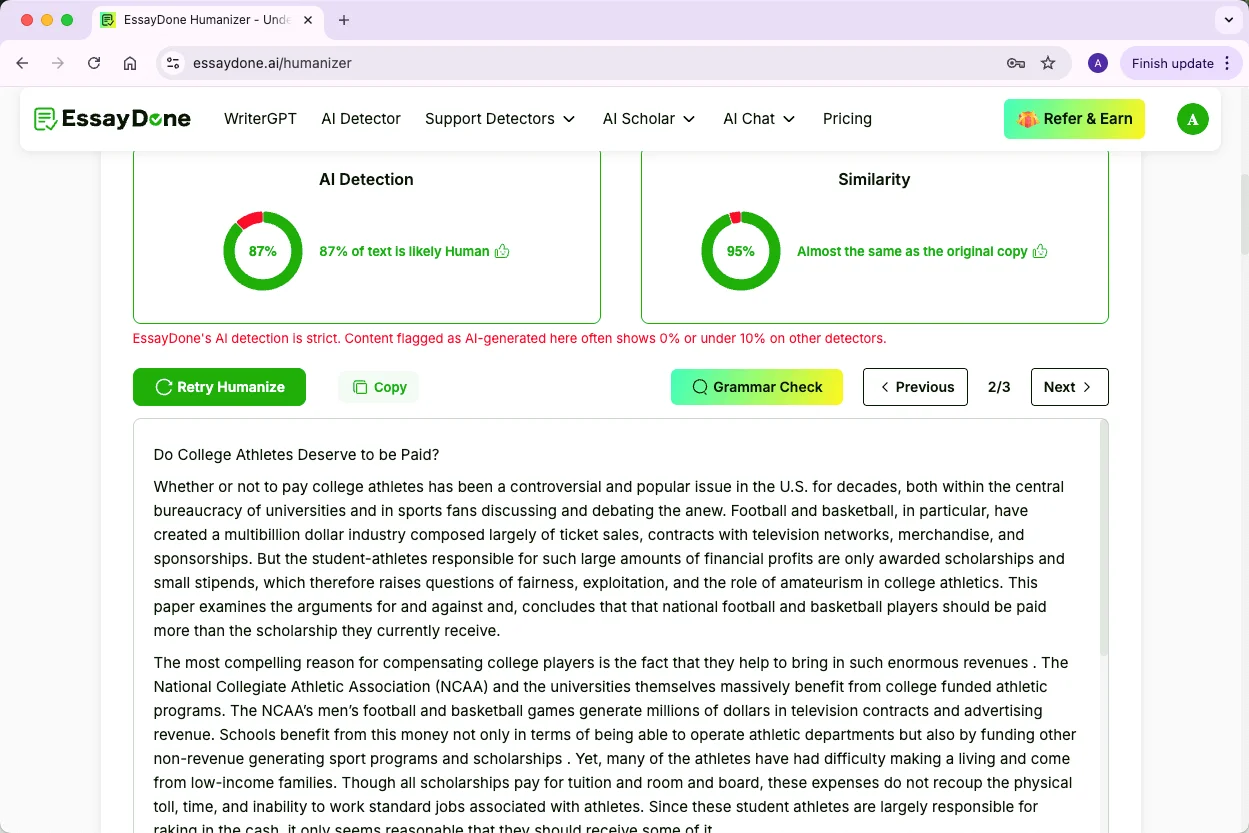
I took the Test 1 text (the 100% AI-generated essay flagged as 90% AI by RyRob). After running it through the Humanizer, the same passage was now scored 90% Human / 10% AI.
And the best part? The text stayed fully readable and professional. It didn’t feel like a robot was “editing” it. The sentences were more varied, transitions felt natural, and the vocabulary flowed in a human way.
Why This Works
The tool works because it changes both structure and language patterns:
Breaks up repetitive sentence lengths
Varies transitions and phrasing
Adds subtle stylistic nuance that AI usually misses
Adjusts word choice to match natural human usage
The result is text that is smoother, more readable, and just feels like something a human would write — all while changing the AI-detection signals significantly.
5 Alternatives to RyRob AI Detector
Looking for other AI detection tools? Here are some top alternatives that are worth checking out:
1. Originality.ai
Originality.ai is a professional tool that combines AI detection with plagiarism checking. It supports multiple file formats and provides sentence-level analysis, making it a solid choice for writers and SEO professionals.
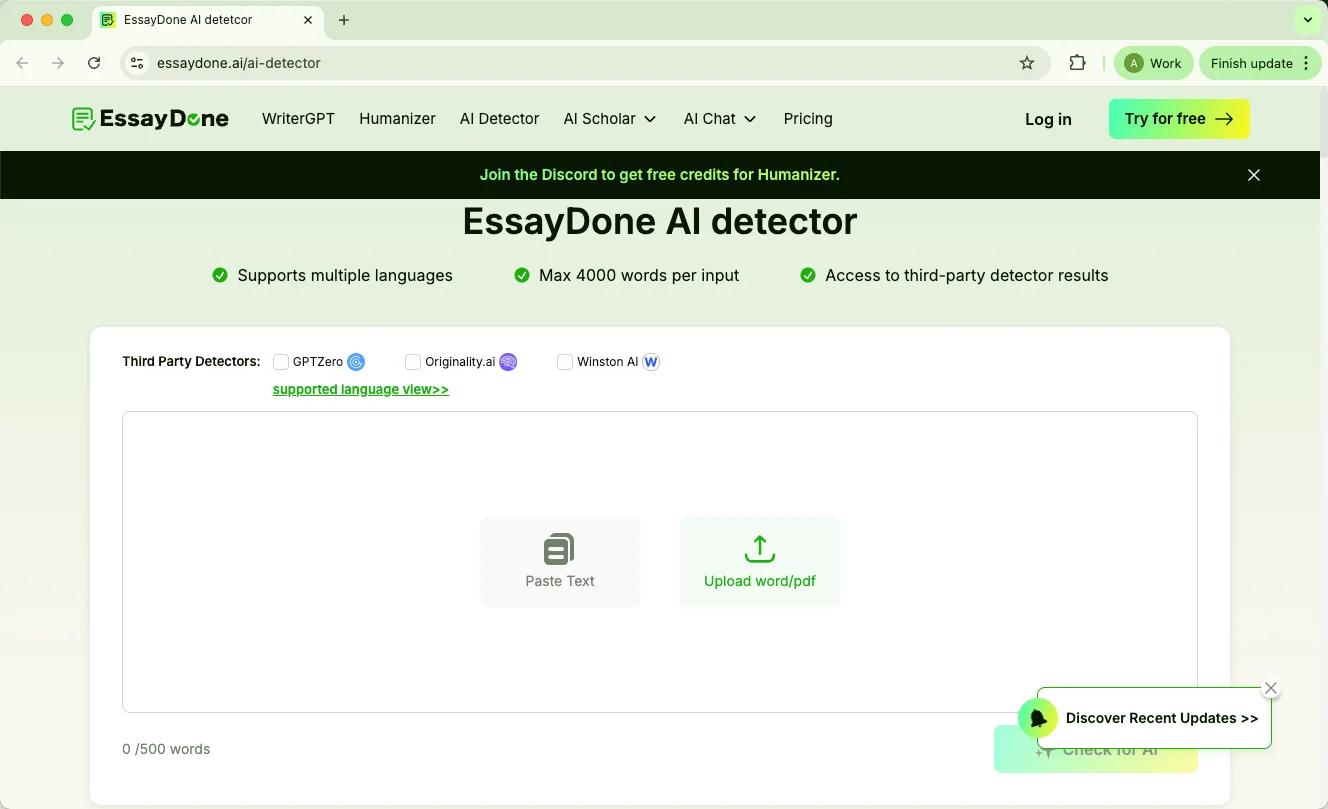
2. EssayDone AI Detector
EssayDone AI detector lets you run text through multiple AI detectors at once, including GPTZero, Originality.ai, and Winston AI. It supports multiple languages and longer inputs, giving a broad view of content authenticity without switching tools.
3. GPTZero AI Detector
GPTZero is designed with students and educators in mind. It not only flags AI-generated text but also gives writing feedback and plagiarism checks, which is helpful for classroom use.
4. Copyleaks
Copyleaks offers AI and plagiarism detection in a single report and supports over 30 languages. It also integrates with Google Docs and comes with a Chrome extension, making it convenient for online content checks.
5. ZeroGPT
ZeroGPT is a straightforward AI detector that also includes plagiarism checking, summarization, and paraphrasing tools. It’s simple to use for text-only checks.
FAQ
Q: Is RyRob AI Detector 100% accurate?
No. It flags fully AI-generated text well but can misclassify mixed human+AI writing. Use it as a guide, not a definitive judgment.
Q: How to bypass RyRob AI Detector?
Using a professional humanizer can transform AI-generated text, making it read naturally and sound authentically human.
Q: Will my professor use an AI detector?
Possibly. Many instructors and schools use detectors for major assignments. Policies vary, so check your syllabus or ask your professor to understand expectations.
Q: Can I use AI detectors on my own work before submission?
Yes. Detectors can highlight formulaic or AI-like patterns. Use them as feedback to improve readability, structure, and originality before submitting.
Q: Are AI detectors legal?
Yes. They are legal tools. Ethical considerations matter: follow school policies and avoid uploading confidential or copyrighted content without permission.
Q: Is RyRob AI Detector free?
Yes. It’s completely free, easy to use, and requires no login. Reports are basic, making it best for short, quick text checks.
Conclusion
So, that’s a wrap on our look at RyRob AI Detector.
We tested it on different types of text, checked how accurate it is, and compared it with some other popular detectors. It does well with clear AI writing, but mixed human and AI content can be tricky, and the reports are pretty basic.
I hope this gives you a clearer idea of what to expect and helps you make smarter decisions when checking your own work.