



Key Insights: How Does Turnitin Detect AI in Student Papers?

Turnitin introduced its AI writing indicator in April 2023 as part of the Similarity Report that many instructors already use. The feature responds to a real classroom question: when a submission appears polished, formulaic, or heavily edited by generative AI, what evidence can help an instructor review it fairly?
This guide explains how Turnitin detects AI writing at a practical level: what text it checks, how the AI percentage is produced, why low scores need caution, and how students should read the report without treating it as an automatic accusation.
What Turnitin Detects
So, can Turnitin detect AI? The answer is: yes.
Since April 2023, Turnitin has added an AI writing detection feature as part of its Similarity Report. This feature is designed to identify two main types of content:
AI-generated content
Text that appears to be created directly by generative AI tools such as ChatGPT, including versions like GPT-3, GPT-3.5, and GPT-4.AI-paraphrased content
Text that was first generated by AI and then altered using AI-based paraphrasing tools, which try to rewrite the content to appear more human.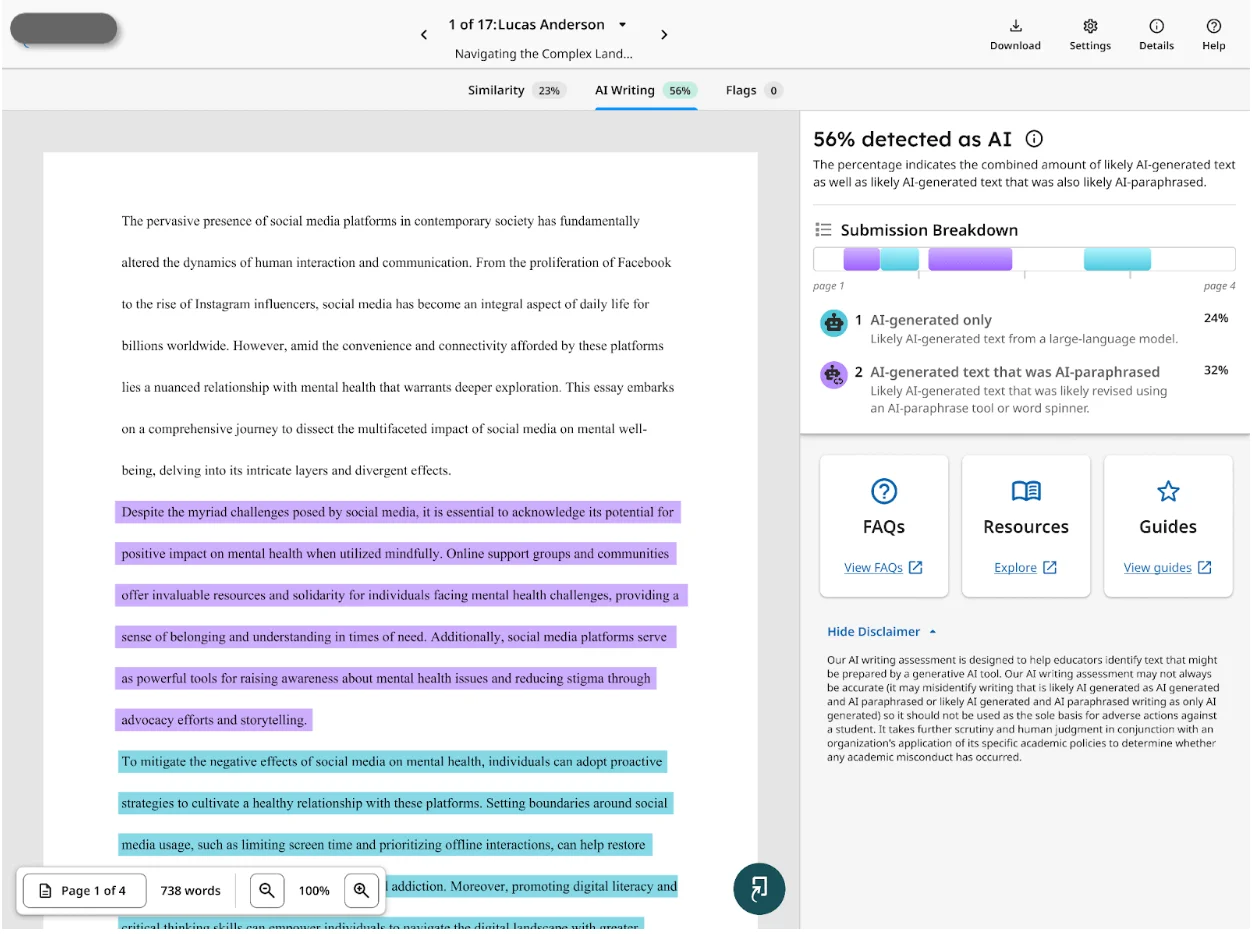
How Turnitin Detects AI Writing In the Essay
If you're asking how does Turnitin detect AI in a student's essay, the short answer is segment analysis plus probability scoring. The details below explain what happens after a paper is submitted.
Step 1: Breaking Down Your Submission
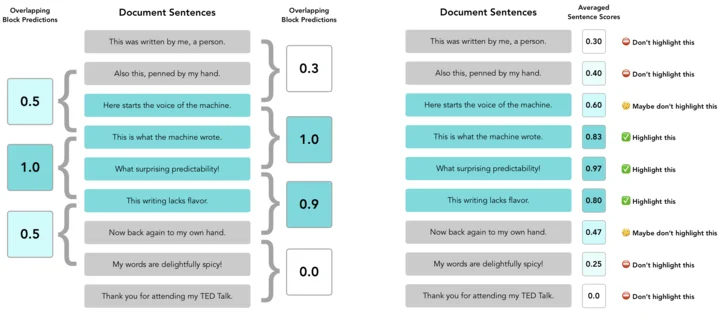
When you submit a paper, Turnitin doesn’t look at the whole thing at once. Instead, it splits the document into smaller parts—usually a few hundred words each. Why? Smaller chunks make it easier for the system to analyze the writing style, structure, and language patterns more accurately.
Step 2: Segment Scoring with AI Models
Each segment goes through Turnitin’s proprietary AI detection models. These models assign a score between 0 and 1:
Close to 0 = likely human-written
Closer to 1 = likely AI-generated
0.5–1 = possibly mixed with AI influence
These numbers reflect the probability, not certainty. Think of it as a “risk score” per segment.
Step 3: Overall AI Percentage
After all segments are analyzed, Turnitin combines the scores into one big-picture number: the AI writing percentage. This shows how much of your paper may have been AI-generated or altered by an AI-based paraphraser.
Important note:
This percentage only reflects qualifying text—typically long-form prose. Bullet points, lists, or code blocks won’t count.
This percentage appears in the report—but does not affect the Similarity Score itself.
Step 4: Pattern Matching (How Turnitin Spots AI)
Turnitin doesn’t just “guess” if text is from ChatGPT or similar models. It scans for patterns typical of AI-generated language:
Predictable sentence structures
Repetitive phrasing
Low variation in sentence length
Overuse of transitional phrases
These traits are common in content generated by large language models like GPT.
Step 5: AI Detection Report & Color Codes
Once processing is complete, the Similarity Report may show an AI writing indicator. Here's how to interpret the display without overreading it:
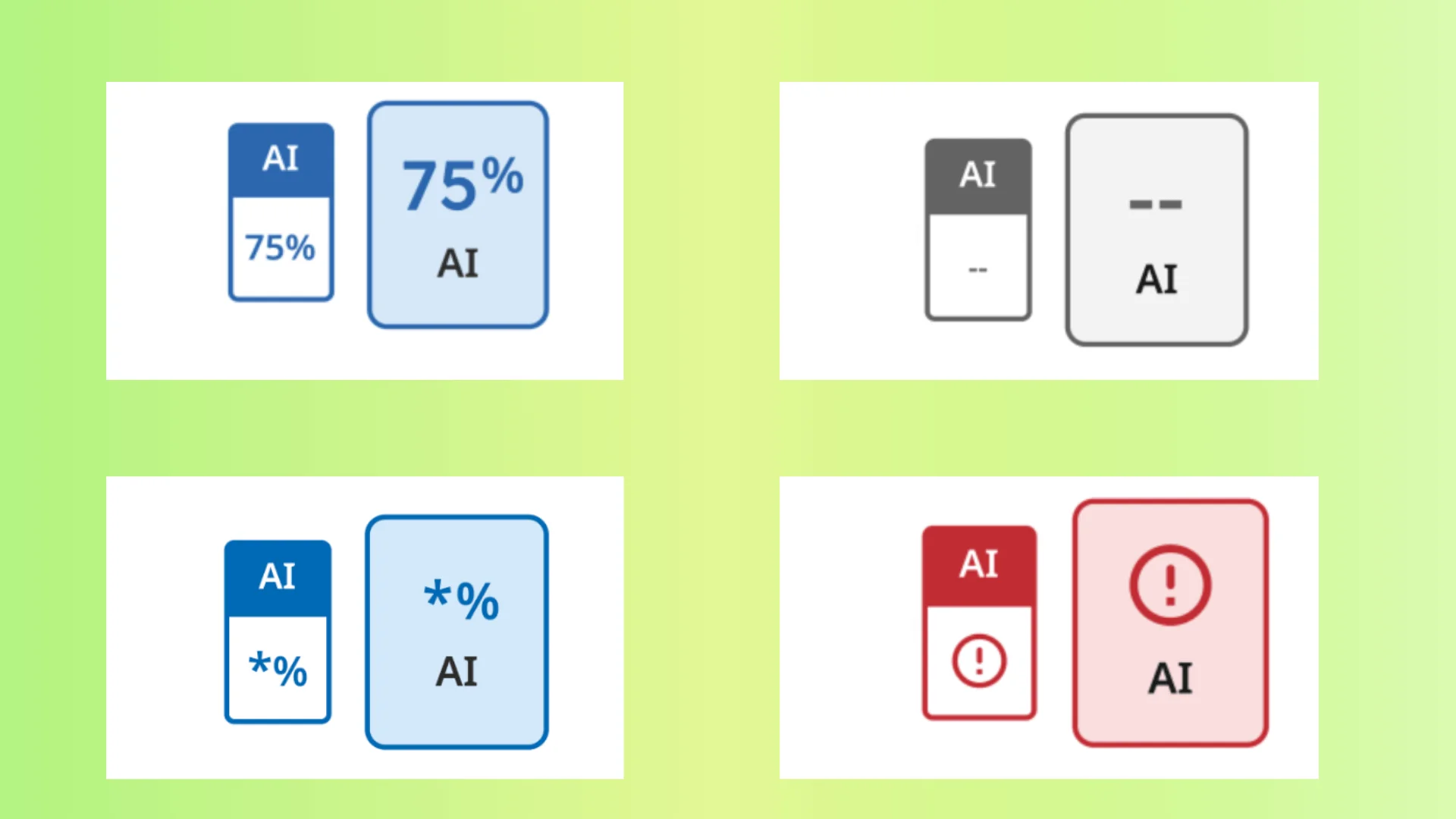
Color Indicators:
🔵 Blue (20%–100%): Processed successfully. Shows detected AI content.
🔵 Blue with * (1%–19%): Low-confidence detection. These scores are less reliable—flagged with an asterisk to prevent overreaction.
⚪ Gray (--%): Not processed. Could be due to file format issues or the submission being too old.
❗ Error (!): System error. Turnitin couldn’t complete the analysis—try resubmitting.
How Turnitin’s AI Detectors Are Trained
Turnitin’s AI detection system is built on a transformer-based deep learning model. This model processes text in small overlapping segments, each covering about five to ten sentences (a few hundred words). These “segment windows” slide through the document one sentence at a time, allowing the system to gather enough statistical data from the words and phrases in each window. This helps the model decide if the text in that segment matches the typical patterns of AI-generated writing.
The model outputs a score between 0 and 1 for each segment. A score closer to 1 means the segment is very likely written by AI; closer to 0 means it’s likely human-written. Turnitin then averages these scores across all segments containing a specific sentence to assign that sentence an AI likelihood score. If the score passes a certain threshold, the sentence is flagged as AI-generated or AI-paraphrased (in the case of the AIR model).
For a full document, Turnitin labels it “AI-generated” only if more than 20% of the sentences exceed the AI writing threshold. This cutoff helps reduce false positives, especially for documents with fewer than 20% AI-like content, where the chance of errors is higher. The system also requires documents to be at least 300 words for reliable processing.
AIW and AIR Models
Turnitin’s AI writing detection tool initially launched with the AIW-1 model and has since improved to AIW-2. AIW-2 detects not only straightforward AI-generated text but also text modified by AI paraphrasing tools, which aim to disguise AI origins by rewriting content.
In addition to AIW, Turnitin uses the AIR-1 model for detecting AI paraphrasing specifically. AIR-1 identifies the distinct statistical traces left by AI paraphrasing tools, which differ from regular AI-generated text. This allows Turnitin to highlight sentences that have been altered by AI, giving educators a clearer picture of the writing’s origin.
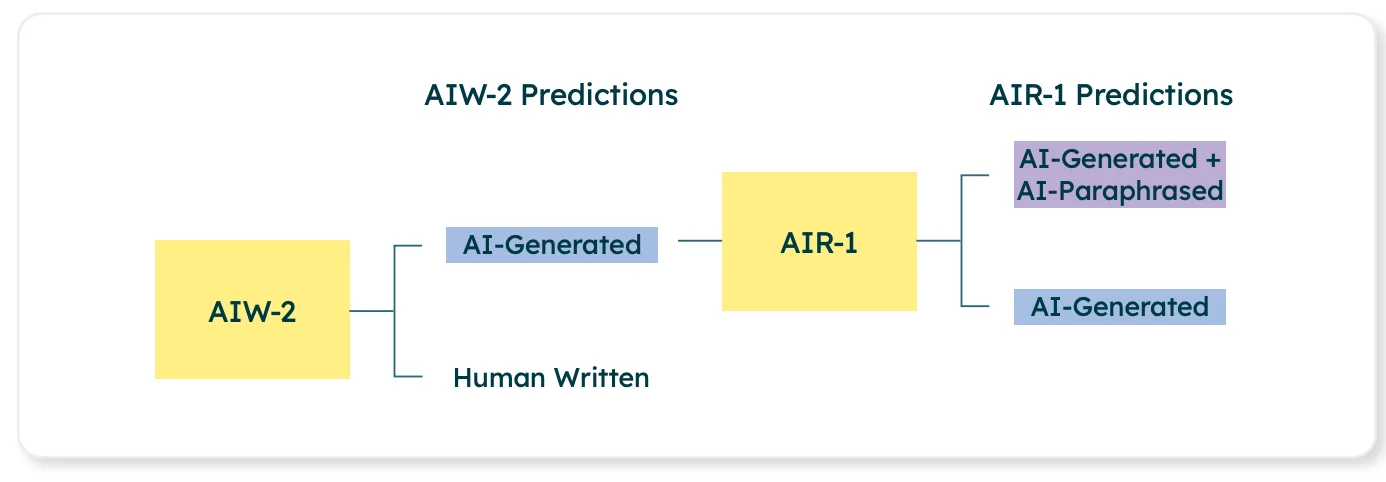
The AIR-1 model only activates on documents flagged by AIW-2 as having 20% or more AI-generated content and doesn’t assign paraphrase labels to sentences identified as human-written.
Training Data and Model Design
Turnitin’s models are trained on a wide and diverse dataset spanning about 20 years of academic writing, including both human-written and AI-generated texts from various subjects and student backgrounds. The dataset also includes mixed types of texts, such as human writing that has been AI-paraphrased or AI writing that has undergone paraphrasing.
Special care was taken to include texts from non-native English speakers, students from different countries, and less common academic fields to reduce bias and improve fairness.
Where Turnitin’s AI Report Appears
Turnitin’s AI detection isn’t a separate tool — it’s embedded directly into the Similarity Report interface.
Part of the Similarity Report
After submission, Turnitin processes eligible text for similarity and, when the institution has AI writing enabled, adds an AI Writing Indicator in the report sidebar. Opening that indicator lets an instructor review the overall percentage and any available passage-level signals.
The AI indicator is separate from plagiarism matching. It should inform a review, not replace the teacher's judgment.
Visibility Controlled by Institutions
The AI detection feature is active only if the institution enables it. That means:
Some institutions show the AI report to instructors but not students.
Some courses may use Similarity Reports without the AI writing layer.
Students usually should not assume they can see the same AI indicator an instructor sees.
Access is managed by institution settings, so visibility varies by account, course, and LMS setup.
How to Check for Turnitin AI Flags Before Submitting
Because many students cannot see the official Turnitin AI result, it is better to review the draft before submission and fix writing that is unclear, repetitive, or unsupported by sources. Third-party checkers can be used as rough preparation, but they should not be treated as the same system your instructor sees.
One option students may compare during revision is:
TurnitinDetector.com – A tool that simulates Turnitin’s AI and plagiarism checks.
Can help you spot passages that look formulaic or over-polished before submission.
Does not replace your school's official Turnitin report or academic integrity policy.
Works best when paired with careful citation checks, source review, and manual revision.
Another option is DocxDetector — a Turnitin-style checker that returns a similarity and AI writing preview when you upload your DOCX before submission.
For broader pre-submission context, EssayDone's AI Detector Tools can compare results from several third-party detectors in one place, which helps you see whether a passage repeatedly looks AI-like before you revise it.
Limitations and Accuracy of Turnitin’s AI Detection
Turnitin's AI checker can be useful, but it is still a review signal. Students and instructors should keep these limits in mind before reacting to a percentage:
AI Detection ≠ Final Verdict
Turnitin states that its AI writing result should not be treated as a final verdict. A high score can start a conversation, but the instructor still needs to consider the assignment, drafting history, citations, class policy, and whether the highlighted writing actually conflicts with the student's known work.
False Positives Are Possible
False positives can happen, especially when a student's natural style overlaps with common AI patterns such as formal phrasing, repeated structure, or very polished transitions. Even when a detector reports low false-positive rates overall, individual cases still need human review.
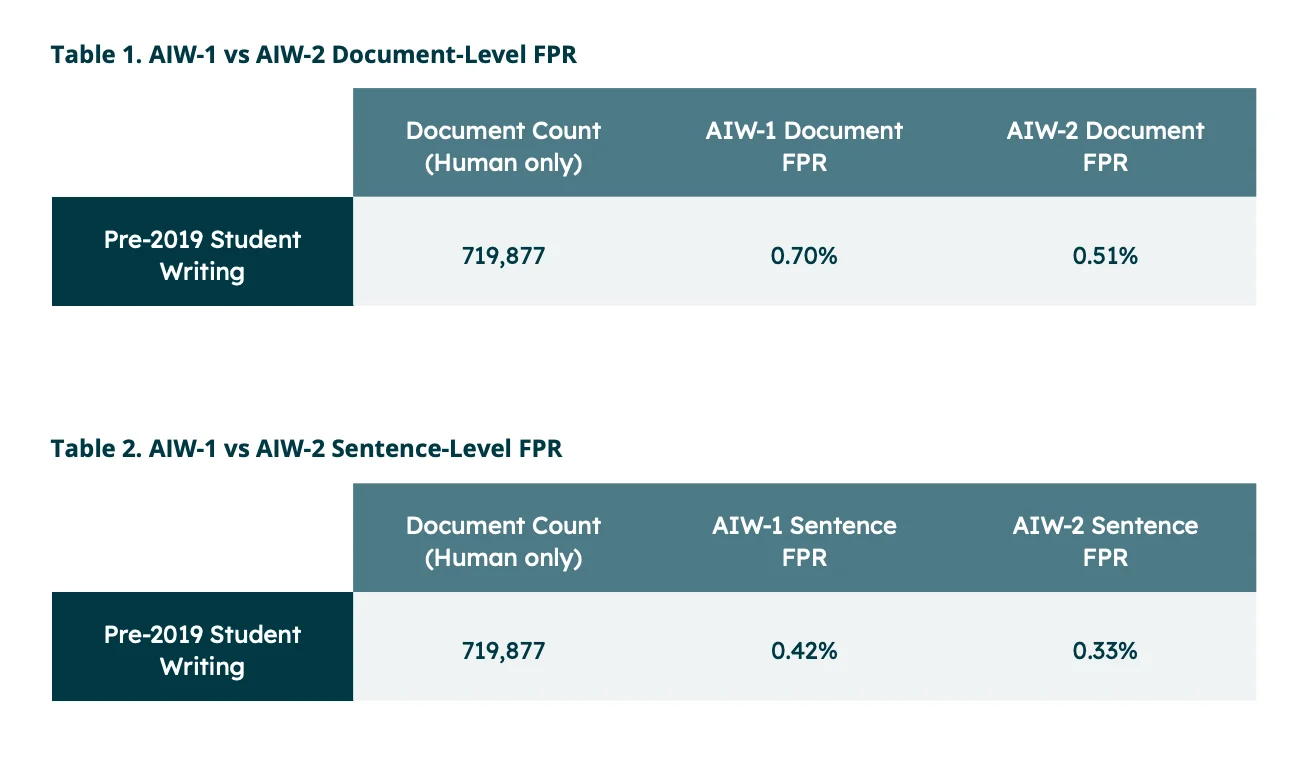
A flagged passage may still be human-written. That is especially relevant for multilingual writers, students using grammar support, or assignments with strict templates that make many papers sound similar.
That is why teacher insight matters. Educators are encouraged to consider:
Earlier drafts or writing samples
Course performance and classroom work
The assignment requirements before making any conclusions.
Constant Updates, But Not Perfect
Turnitin updates its AI writing detection to respond to newer generative models and changes in AI-assisted writing. The practical effect is that report behavior can shift over time: a screenshot from an old guide may not match the current interface in your course.
Because detection limits change, educators should read the AI result alongside the paper itself. Students should focus on transparent writing practices: drafting in their own words, citing sources, keeping notes or version history, and revising AI-assisted sections until the meaning and voice are genuinely their own.

FAQ
Can Turnitin really detect AI?
Yes, Turnitin can flag text that likely reflects AI-generated or AI-paraphrased patterns. The result is useful evidence, but it is not perfectly reliable and should be interpreted with human judgment.
How much AI is acceptable in Turnitin?
There is no universal acceptable percentage. Turnitin does not issue penalties by itself, and each instructor or institution decides how AI use is handled based on the assignment rules, disclosure policy, and context.
Is 40% on Turnitin bad?
Not automatically. A 40% AI score means Turnitin estimates that a substantial portion of qualifying text resembles AI-generated patterns. It does not prove misconduct, and your instructor should review the highlighted writing, assignment rules, and your drafting evidence before deciding what it means.
Summary
Turnitin detects AI writing through segment analysis, probability scoring, report indicators, and model updates. Used carefully, the report can help instructors notice AI-generated or AI-paraphrased passages, while students can use tools like EssayDone's Humanizer to improve natural flow in AI-assisted drafts before final manual review. The final decision still depends on context, not the percentage alone.