




Can Humbot Detect AI? Full Review & Testing Results

If you’ve ever wondered how reliable AI detectors are, this review is for you.
We’ll walk through Humbot, test it with different types of text, and see what really gets flagged.
You’ll get a clear sense of its strengths, limitations, and what to watch out for when checking your own work.
By the end, you’ll know whether it’s worth relying on—or just a tool to use with caution.
What Is Humbot
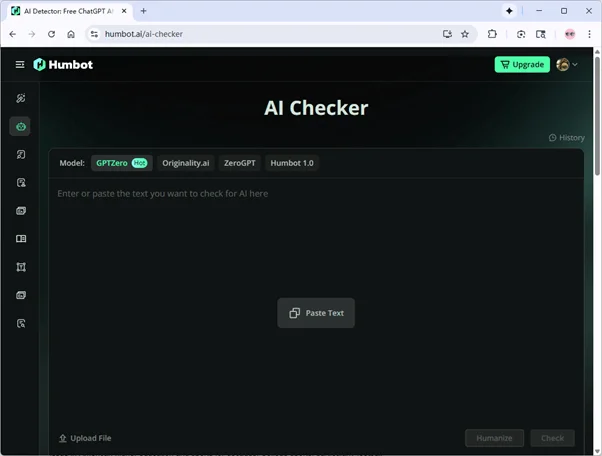
Humbot is an all-in-one AI writing assistant designed to help students and writers create, check, and refine their work. It combines several tools—including AI detection, humanization, translation, and plagiarism checking—into a single platform that supports both learning and writing.
What Is Humbot AI Detector
The Humbot AI Detector identifies whether a piece of text was written by humans or AI systems like ChatGPT or GPT-4.
It works by analyzing sentence patterns, word distribution, and stylistic features that often appear in AI-generated writing. Using deep learning and natural language processing, it compares your text against known AI writing characteristics and highlights suspicious sections for review.
You can use the detector by pasting text directly, uploading a document, or connecting through an API. It supports multiple formats and works in over 50 languages.
Besides detecting AI-written content, Humbot can also identify mixed content—texts that combine human and AI input—and even mark specific sentences that appear machine-written.
Extra Tools of Humbot
AI Humanizer – rephrases AI text to make it sound more natural.
Plagiarism Checker – compares your writing with online sources to ensure originality.
AI Reading Tool (ChatPDF) – lets you interact with PDFs or documents through AI.
AI Translator – supports fast translation across multiple languages.
How Accurate Is Humbot AI Detector
According to Humbot’s website, the AI detector promises high accuracy in spotting differences between human and machine writing through advanced language analysis.
To see how true that is, I ran a few tests using three types of text—pure AI writing, mixed content, and humanized AI text—to find out how Humbot performs in real-world scenarios.
Test 1: Pure AI Text
Setup:
For this test, I generated a short essay entirely with ChatGPT-5.
The text was 100% AI-written, covering a neutral academic topic to avoid bias. My goal here was to see whether Humbot could correctly flag a clearly machine-produced piece.
Results:
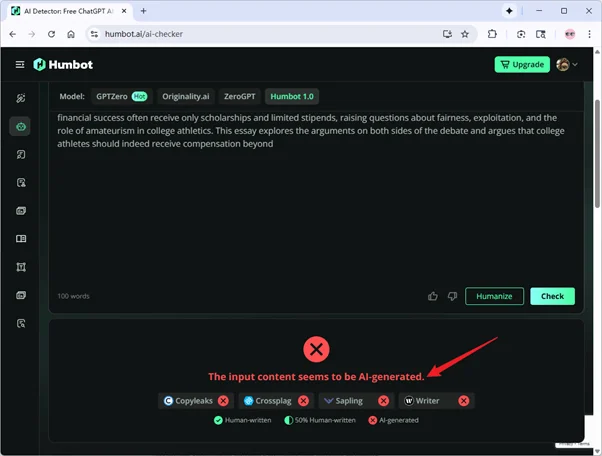
Humbot labeled the text as AI-generated.
Observations:
Humbot AI caught the repetitive rhythm and formulaic structure typical of AI writing. It recognized the text’s artificial origin easily.
Test 2: Mixed AI + Human Writing
Setup:
Next, I used a paragraph from an older human-written essay (created before ChatGPT existed) and added a continuation written by ChatGPT-5.
The final sample contained 187 human words (41%) out of 454 total words. This mix tested whether Humbot could detect blended authorship rather than an all-AI piece.
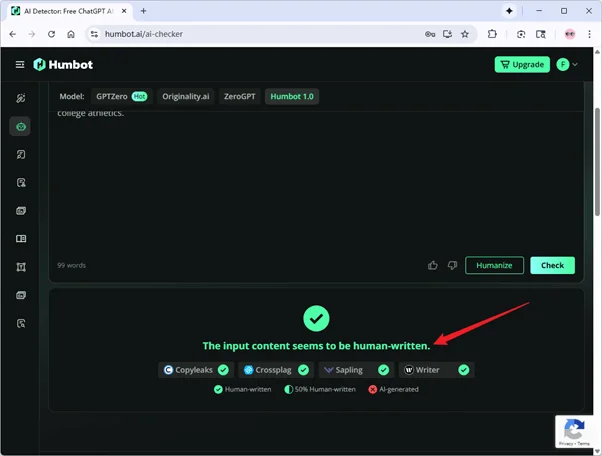
Results:
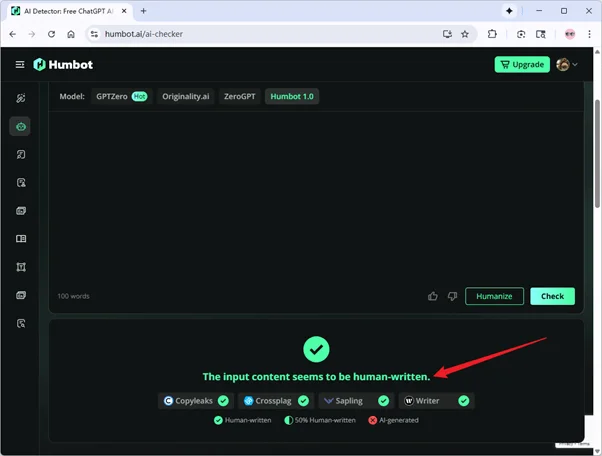
Humbot labeled the text as human-written.
Observations:
This was interesting. Although nearly 60% of the content was AI-generated, Humbot didn’t flag it. That suggests it may lean toward classifying mixed or well-blended writing as human.
While this could reduce false positives for students editing their own work, it also means Humbot might underestimate subtle AI involvement in hybrid texts.
Test 3: Humanized AI Text by QuillBot
Setup:
For the final test, I took the same fully AI-generated text from Test 1 and ran it through QuillBot’s Humanizer (advanced mode).
This step simulated a scenario where someone rewrites AI content to sound more natural before submitting it.
Results:
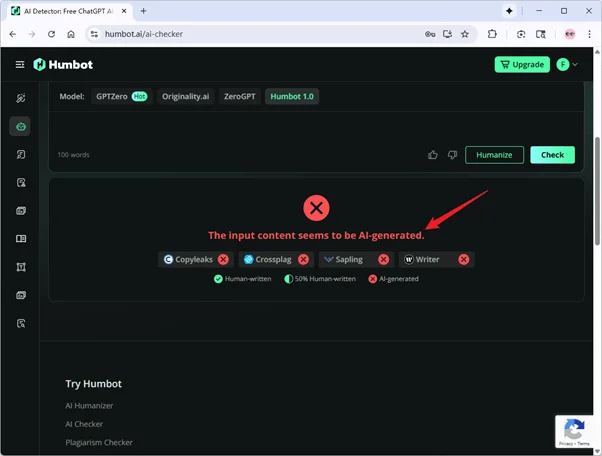
Humbot labeled the text as AI-generated again.
Observations:
Even after humanization, Humbot still detected AI patterns. It likely picked up on the overly consistent tone and unnatural transitions typical of rephrased text.
This shows that simple rewrites from tools like QuillBot still can’t fool Humbot.
Pros and Cons of Humbot
Pros
Fast and Easy to Use: Text is processed quickly, and the interface is simple enough for anyone to navigate.
Broad Detection Coverage: It aligns with detectors like GPTZero, Turnitin, and Originality.ai, offering solid cross-reference value.
Flexible Input Options: Supports pasted text, uploads, and API access for various content types.
Cons
Mixed Accuracy: It often mislabels partially AI-written text as human, limiting reliability for serious verification.
No Sentence-Level Analysis: It doesn’t show sentence breakdowns or AI probability percentages, reducing transparency.
Restricted Free Plan: The free tier has strict word limits and no batch checking.
Occasional Lag: Processing slows down with longer documents or at busy times.
Humbot Pricing
Free trial
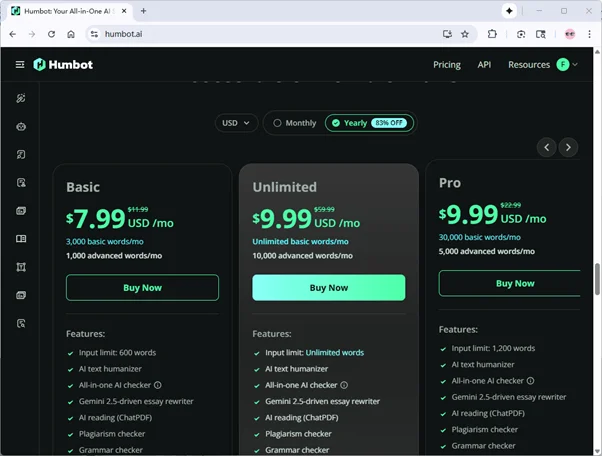
Humbot offers a free trial, but it’s very limited—you can only test up to 100 words, and it doesn’t support the latest detection models.Basically, you can’t even check a full essay without tearing it into tiny little pieces.
Paid tiers
Paid plans increase word limits and unlock full features. The Basic plan allows 3,000 words but still lacks access to the newest models, while higher-tier plans provide more capacity and unlimited usage with full access to all feature
Can You Bypass Humbot AI Detector
Well, the answer is apparent. After running our tests, it became clear that simple tricks—like swapping words or lightly rewriting sentences—aren’t enough. Even when I ran the 100% AI text from Test 1 through QuillBot’s advanced humanizer, Humbot still flagged it as AI-generated.
This is where a professional humanizer comes in. EssayDone Humanizer is designed to go beyond superficial edits. It carefully adjusts sentence structure, phrasing, and word patterns, making the text sound natural while keeping the original meaning intact.
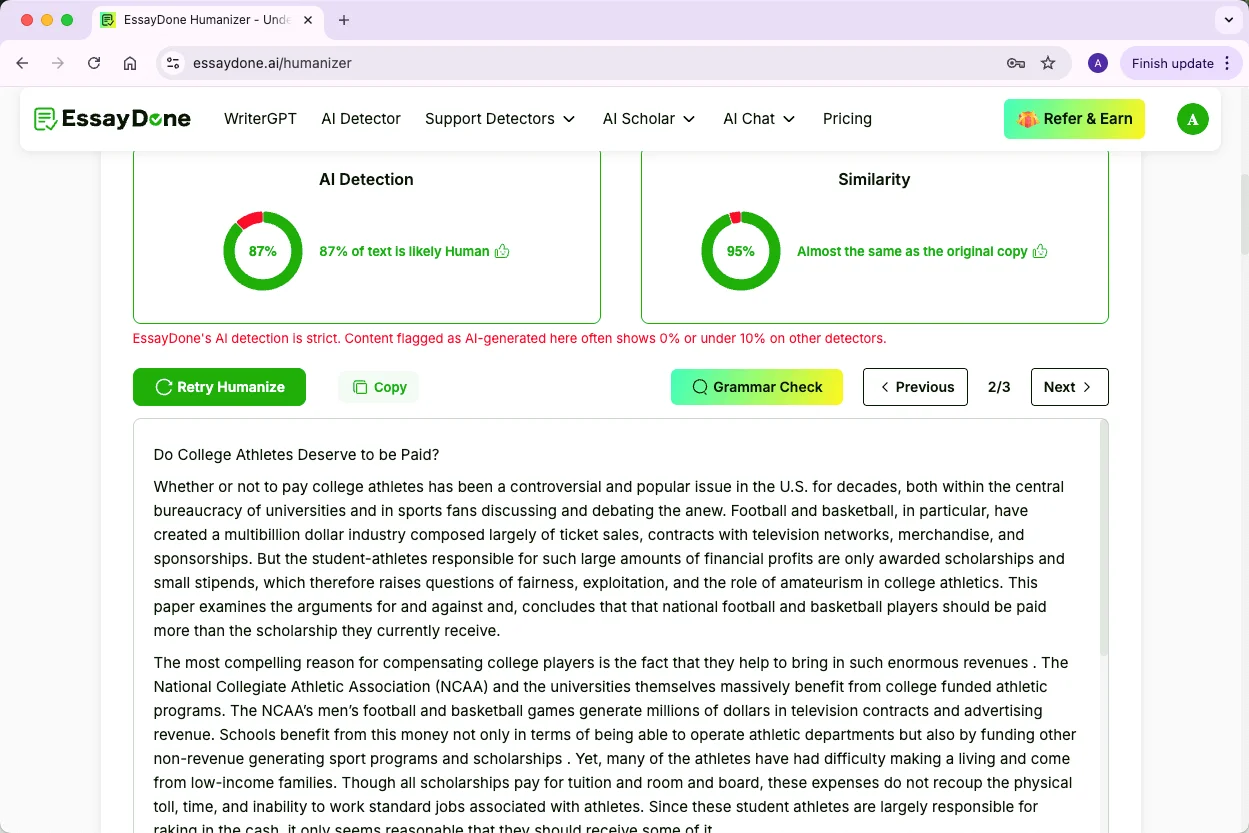
To see it in action, I took the same 100% AI text from Test 1 and processed it through EssayDone. The result? Humbot now classified it as human-written. By changing the linguistic patterns and sentence flow, EssayDone effectively masked the AI fingerprints without breaking coherence or readability.
Alternatives to Humbot AI Detector
Tool | Multilingual | Free Plan | Paid Plan | File Formats | Login Required | Sentence-Level Analysis | Extra Features |
Originality.ai | Yes | Limited trial only | From $12.95/mo (200k words, 2k credits) | PDF, DOCX, DOC, site scans | Yes | Yes | Plagiarism check, fact check, readability, grammar, team tools, Chrome extension |
GPTZero | Yes | 5,000 characters/test | From $14.99/mo (100k chars) | PDF, DOC, DOCX, TXT (50MB max) | Yes | Yes | Writing feedback, plagiarism check, citation tools |
Copyleaks | Yes (30+ langs) | 15,000 characters/test | From $16.99/mo (100k chars) | Copy-paste only | No | No | AI + plagiarism in one report, shared data hub, Google Docs add-on, Chrome extension |
ZeroGPT | Yes | Yes | From $9.99/mo | Text only | No | No | Plagiarism check, AI summarizer, AI paraphraser |
QuillBot | Yes | 1,200 words/test | From $8.33/mo, Unlimited Scan with premium | Multiple (DOCX, TXT, etc.) | No | Yes | Paraphraser, summarizer, grammar check, plagiarism check, text humanizer |
FAQ
Is Humbot 100% accurate?
No AI detector is perfect, and Humbot is no exception. While it can reliably spot fully AI-generated text, it struggles with mixed or humanized AI content. Accuracy can vary depending on text type and length.
How to bypass Humbot AI detector?
Simple rewriting or word swapping usually isn’t enough. Professional humanizers, like EssayDone, restructure sentences and adjust language patterns, effectively lowering AI detection rates without compromising readability.
Will my professor use an AI detector?
Many professors now use AI detectors like Turnitin or GPTZero, especially for essays and research papers. It’s becoming increasingly common in academic settings.
Can I use AI detectors on my own work before submission?
Yes. Running your work through a detector can help you check for AI-like patterns and ensure your text aligns with your own writing style before submitting.
Are AI detectors legal?
Yes. AI detection tools are legal to use for academic or professional purposes. However, using them to deliberately disguise AI-generated content in dishonest ways can violate institutional policies.
Is Humbot AI Detector free?
Humbot offers a free trial, but it’s very limited—only 100 words and no access to the latest detection models. For serious use, a paid plan is necessary.
Conclusion
So, that’s our deep dive into Humbot AI Detector—how it works, what it can and can’t do, and how accurate it is in different text scenarios.
We looked at pure AI text, mixed writing, and humanized AI text, and even explored ways people try to bypass it.
Hopefully, this article gives you a clear picture of what to expect and helps you decide how to use AI detectors responsibly in your own writing.
Stay aware, and always double-check your work.